Templates
Templates holds the two files an item is copied from, the chains and the library, as screens. Each edits a draft: your changes take effect when you select Review & publish, which shows what changed and checks it first. YAML shows the file itself. Open items, every one not done or cancelled, keep the chain they were filed with, and the screens count them as open.
Chains
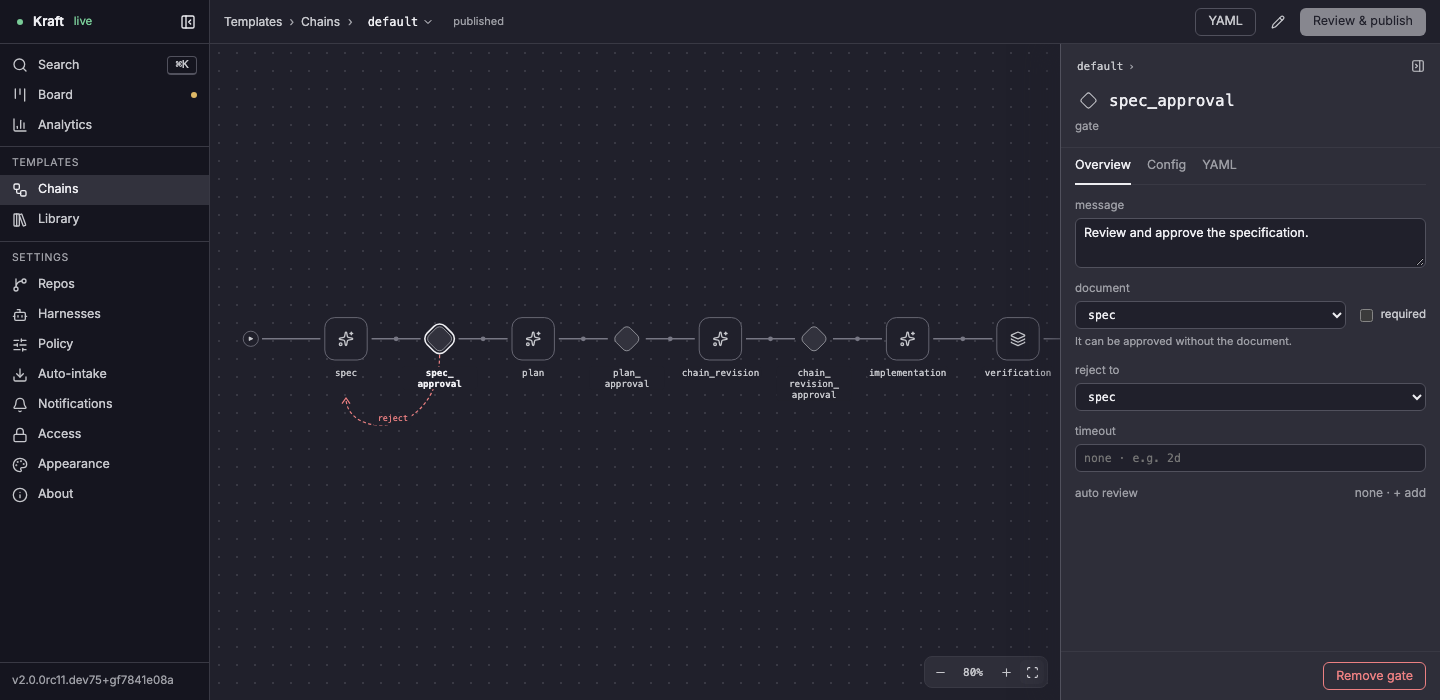
Chains draws a chain as a graph, picked from the menu beside Chains. How a chain is built, extended and merged is in Library and chains; Write your own chain walks through an edit.
| Control | What it does |
|---|---|
| A node | Select it for its settings in the inspector; double-click for its own view of steps and tasks. A long chain has an overview above it |
| The inspector's name | Rename in place. Renaming the chain shows old → new beside Chains until you publish, and publishing moves its file to the new name, which new items then name |
| Review & publish | Becomes Back to editing while you review. The reason Publish is blocked is written above it |
| Duplicate | Copies the chain under a new name |
| N defaults · show | Settings nothing sets fold into this line. A task's Config leaves out agent settings a command or merge-request task never uses |
| reviewer may, on a gate with a reviewer | check first (reject, or hand it to you) or decide (can approve); it sets auto_review_mode. See A reviewer that checks first |
fallback, in a task's Overview | A list of entries; an entry's model and effort are set only in YAML. Chain file keys has the keys |
| A node's own view | A bottom pane with On failure, Fix loop, Escalation and, once on base change is set, On conflict. An On failure recovery has a read only switch |
| A node that merges its merge request | It has On merge rejected, and Fix loop only if it already has one. Selecting it draws the restart as an arc labelled on merge rejected; it sets restart_from (Merge queue and train drops). read only is on and locked |
A value that isn't on a key's allowed list (ref, target, inputs, steering, grants, allowed_harnesses) is marked and isn't saved: Chain file keys has the lists.
Chains on a phone
Added in 2.1
More › Chains edits a chain's time caps and a node's or task's Config rows into the same draft. Adding, removing and reordering nodes and steps, renaming a chain and editing on-failure handlers stay on the desktop.
An extending chain
Added in 2.2
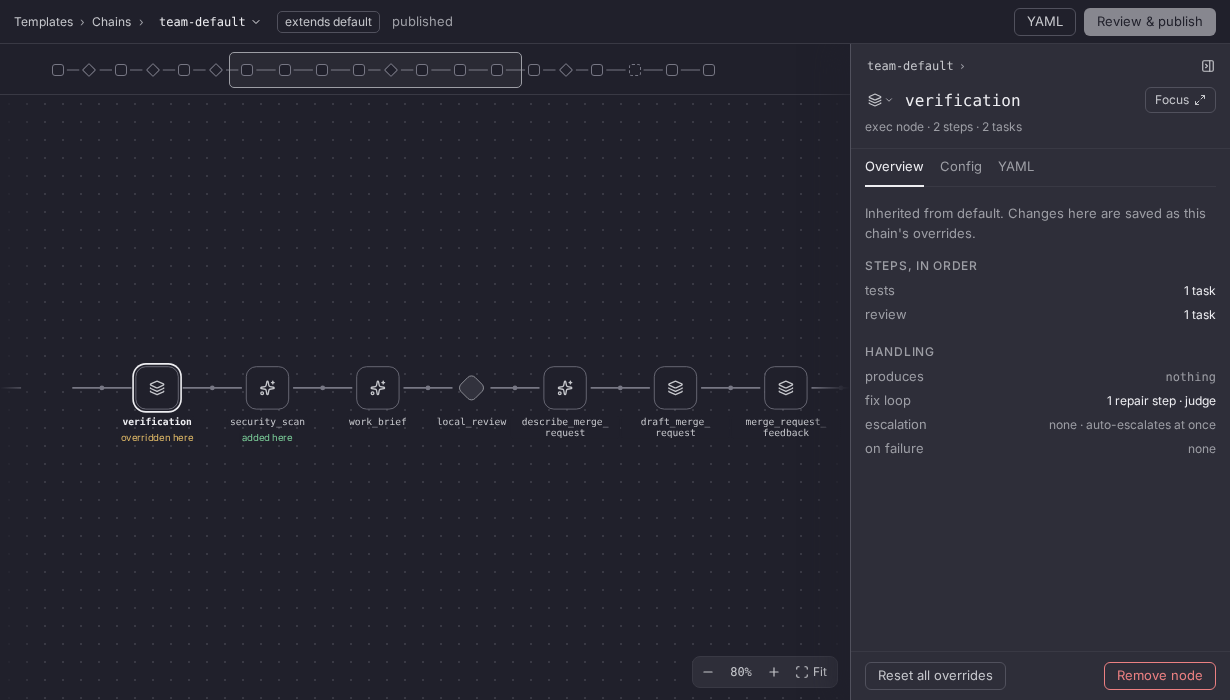
A chain that extends another is edited like any chain, and every change is written as one of its edits. The header shows extends <parent>.
| Mark | Meaning |
|---|---|
added here | A node the chain adds. It is edited in full |
overridden here | A node whose fields the chain overrides. ↺ or Reset all overrides deletes the override |
removed, faded | A parent node the chain removes. Restore puts it back |
| No mark | A node inherited unchanged. Its fields are editable, and a change writes an override |
What is inside an inherited node is its parent's. Rename, Change base…, Move to library…, its YAML tab, and adding or removing its steps, tasks and handlers are disabled, each saying Inherited from <parent>: change it in YAML, or detach the chain. These marks are about extends; a child add-on's read inherited from <parent>.
| Control | What it does |
|---|---|
| Duplicate › Extend | Starts a chain that keeps following this one, under an ID starting <chain>_ext |
| Duplicate › Copy | Makes a standalone copy you own. The default for a chain of your own |
| Change base… | Picks another chain to follow, and lists what the new parent takes and drops before anything changes. Ctrl/Cmd+Z undoes it |
| Detach… | Writes the chain's nodes into its file, so it stops following its parent. Ctrl/Cmd+Z undoes it |
When the edits no longer apply to the parent, the canvas says <chain>'s edits don't apply to <parent>. Fix them in YAML. Changing or ending the parent has what each control writes.
Content from an add-on
Added in 2.1
A chain or component that an installed Kraft add-on ships is listed beside your own under its qualified name, such as release:ship, with a badge naming the add-on and its version: release@acme 1.0.0. It is read-only: the screens show its settings and YAML and offer no control that changes them.
| Control | What it does |
|---|---|
| Add to my library, on a chain | Where Duplicate stands. Extend, the default, starts a chain of your own that extends the add-on's; Copy makes a standalone copy |
| Copy to my library, on a component | Asks for a name and opens a draft of your library |
The phone shows add-on content but has neither button. A repo library's content is listed the same way with the badge repo library <id>, read-only, and with neither button: edit it in that repository's .kraft/. Qualified names says what a copy keeps.
A child add-on's chains and components
Added in 2.3
A chain or component of an add-on that builds on another add-on carries a mark beside its badge:
| Mark | Meaning |
|---|---|
inherited from <parent> | An ancestor wrote it and this add-on passes it on unchanged |
overridden here | This add-on wrote one of a name its parent has |
added here | This add-on wrote one its parent lacks |
Add-ons are installed and updated with kraft admin addon, not on a screen.
Library
Library lists the components chains are built from, under Nodes, Steps, Tasks and Steering, each with how many chains use it. With nothing selected it shows a tile per section; a tile narrows the list to that section, and Show all brings the rest back. A component's Config tab appears only when it writes a setting its Overview doesn't already edit.
The filter button narrows the list by Kind and, once an add-on or a repo library ships components, by Source: Local for your own library, then each add-on or repo library by name. While any filter is on, the list says Hiding N of M with a Reset filters link.
Related
- Chain file keys and Write your own chain: what the Chains screen draws, and how to change it.
- Configuration: the YAML files these screens edit.
- Share chains with add-ons: install an add-on whose chains this screen lists.
The review page
The review page's Compare toolbar, Viewed marks, line comments and Finish review dialog, and how the page opens at a gate.
Settings
Each Settings screen that sets up Kraft itself, with the file it edits and whether a change saves at once, waits for a draft to be published or needs a restart.