Work item statuses
A work item holds one of seven statuses, and the board shows a status of its own computed from it. This page lists both, and the moves between them.
Statuses
A work item always holds one of seven statuses. Five are open and two are ended. An ended item never runs again.
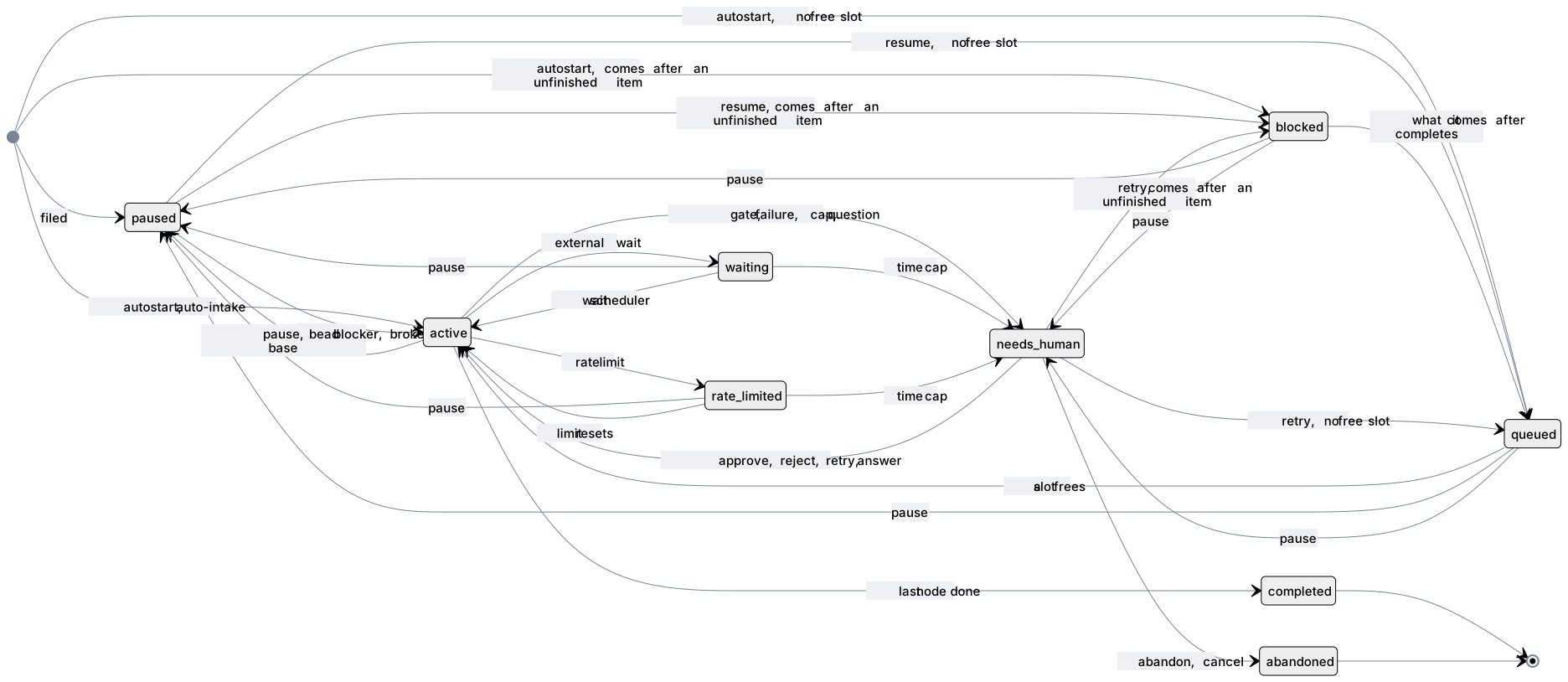
The diagram shows the usual paths. complete and cancel can end an item
from any open status, and abandon from any status but active. The second
table below lists every move.
| Status | What it means | The board shows it under |
|---|---|---|
paused | Filed and not started, or stopped by a person. Nothing runs. | Not started if it never ran, else Needs you |
active | Kraft is running a node. It takes one of the max_concurrent slots. | Running |
waiting | Parked on something outside Kraft: CI, an automated review, an approval, a merge landing. It holds no slot. | Running |
rate_limited | The agent hit its provider's rate limit. Kraft starts it again when the limit resets, with no one paged. | Running |
needs_human | Stopped at a gate, or stopped and waiting for you after a failure, a cap, or an agent's question. | Needs you, or Running while an escalation turn works on it |
completed | Ran to the end of its chain, or a person marked it complete. | Done |
abandoned | A person cancelled or abandoned it. | Done |
Moves between statuses
Each row is one move and its cause.
| Move | Cause |
|---|---|
filed → paused | Every item, unless it was filed with --autostart, and an --autostart item when no max_concurrent slot is free. |
filed → active | --autostart, or auto-intake, when a max_concurrent slot is free. With none free, auto-intake files nothing. |
paused → active | kraft item resume, with an optional steer. |
active, waiting, rate_limited → paused | kraft item pause, or Kraft itself when a linked bead is blocked, or when the base branch it sits on turns red after another item's merge. |
active → waiting | A task started an external wait. |
waiting → active | The wait scheduler looks again when its next check is due. |
active → rate_limited | An agent launch was rate limited and no fallback was left. |
rate_limited → active | The limit's reset time passed. |
active → needs_human | A gate was reached. |
active → needs_human | A stop of any other kind: a task failed after recovery and the fix loop, a cap or a budget ran out, a wait timed out, a config error, or an agent asked a question. Stop kinds names each kind. |
waiting, rate_limited → needs_human | A time cap ran out while the item was parked. |
needs_human → active | kraft item approve or reject at a gate. |
needs_human → active | kraft item retry after a stop. |
needs_human → active | kraft item resume --steer, to answer an agent's question. |
needs_human → active | An escalation turn that retries the item. |
active, waiting, paused, needs_human → active | kraft item skip, which moves past the current node or gate. |
active → completed | The last node finished. |
any open status → completed | kraft item complete --reason. It leaves the item's issues in beads open unless you add --close-beads. |
any open status → abandoned | kraft item cancel --reason. It keeps the worktree until you archive. |
any status but active → abandoned | kraft item abandon. It removes the worktree and branch at once, unpushed commits included, and a cancelled item's too. Pause an active item first. |
kraft item retry is the only way back onto an item that a failure stopped,
and it only works from needs_human. resume only works from paused, apart
from answering a question. A reject that has already hit its gate's reject
limit leaves the item in needs_human.
Displayed status
The board's status badge is a separate value, display_status. Kraft computes
it each time it is read, from the stored status, the stop's kind (stop_kind,
one of the kind values in
work_item_needs_human), whether a
gate is pending, and whether an escalation turn has run since the item
stopped. GET /api/work-items and GET /api/work-items/{id} report it (see the
HTTP API).
It is exactly one of nine values. Kraft checks the rows top to bottom, and the first that matches decides:
display_status | When |
|---|---|
archived | archived_at is set, whatever the stored status |
done | completed |
cancelled | abandoned |
paused | paused, including an item that has not started (current_node_id is null) |
running | active |
waiting | waiting or rate_limited: something outside Kraft will come back by itself |
needs_you | needs_human with a gate pending, or a stop no rule below claims |
escalated | needs_human, no gate pending, and an escalation turn is working on this stop: one began since it did, and its session is still running |
failed | needs_human, no gate pending, no escalation turn working, and stop_kind is failed, config or infra |
A stop recorded before stop_kind existed has no kind and shows needs_you.
A stuck stop that automatic escalation will pick up changes its displayed
status three times:
needs_youwhile the countdown to the escalation runs.escalatedwhile the escalation turn's session runs.- The stop's own status (
failedorneeds_you) once that session exits.
The item is then yours to retry.
Why infra shows as failed
An infra stop shows as failed and not needs_you because nothing will
change it on its own: no handler applies, and no timer or escalation will make
a different answer come back.
These are all infra stops:
- A server restart that lost a session.
- A worktree refresh that git refused.
- CI infrastructure that ran out of retries.
- In a node with a fix loop, a forge task that failed because the forge refused the credentials or could not be reached.
The way out is to fix the cause and retry.
MR closed externally
An item parked waiting or needs_human at a merge-request node can have its
merge request closed on the forge by someone, or something, other than Kraft:
closed, not merged.
A poller checks every such item against the forge on a fixed interval
(policy.forge_poll_s, default 300 seconds). When it finds the merge request
closed, it stops the item with stop.kind: "mr_closed" and
facts: {ref, url} naming it. The item's displayed status is then needs_you.
There are three ways out, and no fourth.
| Way out | On the item's page | What it does |
|---|---|---|
| Reopen the same merge request | Reopen !N (N is the merge request's number) | Reopens it on the forge and retries the stopped node, as a retry with no path would. |
| Retry from the merge request node | Open a new MR, when the item had opened one | Opens a fresh merge request instead of reusing the closed one. |
| Cancel the item | Cancel item… | Leaves the closed merge request and the worktree as they are. |
The buttons are on the item's state card, which the board's side panel shows too. The header's main action reads Reopen MR and does the first. Gates, run control, ending and retry gives the route behind each.
Related
- How a work item runs: the lifecycle these statuses belong to.
- Why did my item stop?: the reason for each stop, and its fix.
- Events: the
stop.kindvalues and every event that moves an item.