The board
The board lists every work item, grouped by what it needs from you. This page names its groups, a row's buttons, the filters, and the side panel that opens when you click a row.
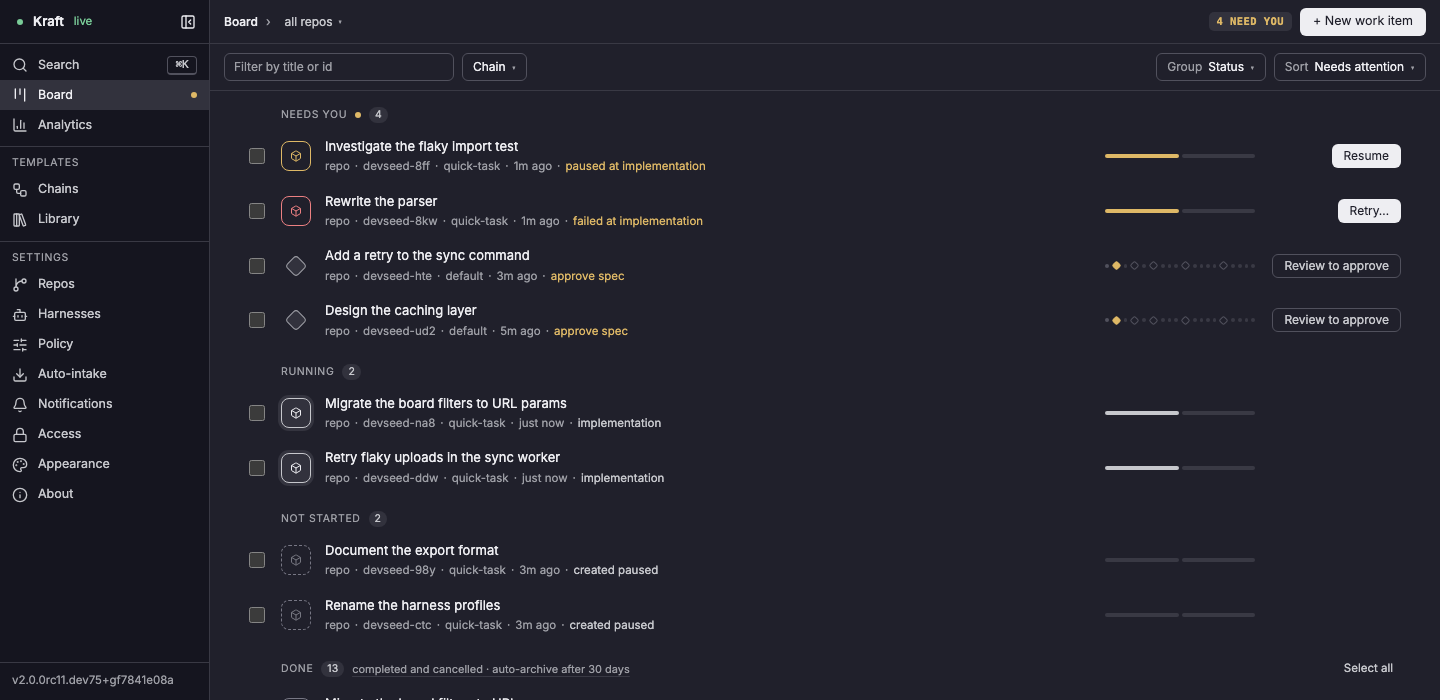
The groups
The board has four groups:
- Needs you: a gate waits for your approval, an agent asked a question, the item stopped on a failure or a cap, or a person paused it mid-chain. It always comes first, and the header shows how many with N NEED YOU. The sidebar's Board, an item page's N others need you and the phone's Board tab count the same items.
- Running: an agent or a check is working on it.
- Not started: filed paused and never started.
- Done: completed and cancelled items. It shows the five most recent; show all N shows the rest.
A row
Each row shows the title, then the repo, the item's ID, its chain, how long
ago it changed, and why it is where it is (approve spec,
failed at implementation, created paused). The ticks on the right are the
chain's nodes, filled in as the item moves along it. A row that needs
something carries one button:
| The row says | It does |
|---|---|
| Review to approve | opens the item's review page at the waiting gate, with the gate's brief open beside the diff |
| Answer | opens the side panel at the agent's question |
| Raise cap | for a time or attempts cap: opens the side panel's Config tab, where the panel's own Raise cap opens the editor |
| Retry… | for a failed item or a stuck fix loop: opens the side panel, where Retry is |
| Resume | resumes a paused item that has already started |
| Raise budget | for a dollar or token budget stop: opens the side panel, at the editor or at a banner, by the stop |
| Open | opens the side panel for any other stop |
A row that has not started has no button. Start it from the side panel.
For what each stop offers and how to raise it, see Raise a cap on a stopped item.
Filter, Group and Sort
- Filter by title or id narrows every group as you type. / jumps to it.
- Chain ▾ shows only items on one chain.
- The all repos ▾ menu beside Board at the top shows only one repo.
- Group sorts the rows into groups by Status (the default), Repo or Chain. Needs you comes first in all three.
- Sort orders the rows within a group: Needs attention, Recently updated, Created or Title.
The filter, group and sort are kept in the page address, so a link you share opens the same view.
Selecting several items
Tick a row's checkbox (or press Space on a row) to select it. A bar appears at the bottom with what you can do to the selection:
- ‖ Pause N pauses the selected items that are running.
- Cancel N… cancels every selected item that has not ended. It asks for a reason first, and the reason goes into each item's run log. For a few seconds after you confirm, Undo in the message at the bottom takes it back.
- Archive N archives the selected items that are completed or cancelled. It is grayed out until you select one of those.
- Clear drops the selection.
Select all on the Done header selects the finished items the group is showing (the newest few, five by default, or all of them after show all N), so Archive clears those off the board in one go. If some of the items refuse the action, the bar lists each one with its reason and keeps them selected.
Archived items
The Done header carries a link, completed and cancelled · auto-archive
after 30 days (the number is archive.after_days in
policy.yaml). It opens Archived, at
/archived, which lists every archived item. Filter it, sort it by
Recently archived, Created or Title, and click Restore on a
row to put it back on the board. Tick several rows for Restore N. On a
phone, Archived is under More: open an item there to restore it.
The side panel
Click a row and a panel opens on the right, over the list, without leaving the board. Its heading shows the item's title, and under it the item's ID, its group and why it is there. It has three tabs:
- Overview: the item's state card with what it is waiting on and the buttons to act on it (approve, answer, retry, raise a cap, escalate), and a short view of the chain with the node it is at. A stuck fix loop's card gives its reason, Retry from the task, and Escalate….
- Activity: every event on the item, newest first. Show earlier loads more. Click an event about a node to open that node.
- Config: the limits the item runs under (its budget, tokens, the day's spend across all items) and anything changed for this item alone. The pencil beside Budget edits the item's dollar cap.
The bottom of the panel holds the item's main action, the same as the item page's header (on An item's page). Open item ↗ and Focus both open the item's full page.
To skip the panel, ⌘-click (Ctrl-click) or double-click a row. Set Settings › Appearance › Board › Open items in to Full page (the other value, Peek, is the side panel) to make a plain click do that too.
While the panel is open, Tab from the selected row goes into the panel and on to the next row after it. The row buttons the panel covers are skipped, as a pointer cannot reach them either. The other keys for the board and the panel (/, ↑, ↓, Space, ⌘↵, Esc) are in Keyboard shortcuts.
Related
- An item's page: the full page that Open item ↗ opens, with the chain graph and the inspector.
- Raise a cap on a stopped item: what Raise cap and Raise budget open, stop by stop.
- Work item statuses: the seven statuses, and the status the board shows for each item.