Kraft runs the task.You make the calls.
Kraft runs on your own machine. It hands coding tasks to your coding agent, checks the work and stops only for the decisions that are yours.
- Agent: Writes the plan, still to come
- You: Approve the plan?, still to come
- Agent: Writes the code, still to come
- Kraft: Tests, then a code review, still to come
- You: Approve the change?, still to come
- Kraft: Opens a draft merge request, still to come
- You: Approve the merge?, still to come
- Kraft: Merges, still to come
PAUSED
This work item is one coding task, filed with your spec.
It's paused and spends nothing until it starts. Dashed steps are still to run. Each diamond is a gate: a stop that waits for you.
Not another coding agent.
Kraft runs the one you already use, and adds what a single session can't.
Why KraftHow a run stays on track.
How it worksA process the agent can't skip.
Each work item follows a chain, a YAML file you can read and diff.
A person at the decisions.
A gate stops the chain until a decision is recorded. You approve, or request changes with a note.
Checks it doesn't grade itself on.
Kraft runs your tests in a node of its own, waits for your CI and has a separate reviewer decide whether a fix is done.
Capped retries and spend.
Attempts, time, tokens and dollars are bounded. A capped item stops and hands you the full trace.
- id: plan kind: exec tasks: - id: author extends: plan_author - id: plan_approval kind: gate message: Review and approve the implementation plan. artifact: plan reject_to: plan …One board for what needs you.
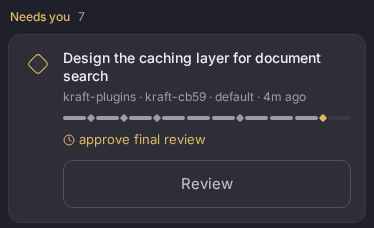
Open it on a laptop or a phone, or clear gates from VS Code or the command line.

Yours to shape and scale.
Change the chain.
Extend the default chain or write your own. Share chains as add-ons. Pick the agent and model for each task.
id: with-lintextends: default add: - after: verification node: id: lint extends: lintRun more at once.
Split a large plan into slices that several agents build at once. Kraft joins the results before review.
Scale upInstall Kraft.
uv tool install kraft-sdlc Then start it with kraft, connect a repo with kraft repo connect, and file your first work item.
You need macOS or Linux, git, uv and a signed-in Claude Code. Opening a merge request also needs gh or glab signed in, or an API token.
Kraft is free and Apache-2.0. Your agent provider bills the sessions. It runs as one local process, with no telemetry.