Your first work item
Part 1 of 2. A work item runs through a
chain of nodes, and a
gate is a node where the chain stops for you. The
shortest shipped chain, quick-task, has none, so you write a short one-off
chain: quick-task's two nodes and a gate where you approve the change. It
takes about fifteen minutes, most of it spent waiting on an agent.
Part 2 runs the default chain to a merged
merge request.
Before you start
You need:
- Kraft installed and its server running, with Claude Code signed in and Kraft
registered with it. Install covers all of that, and
ends with
kraft admin doctorpassing. - A git repo to work on, with at least one commit (
git log -1shows it: a work item's branch starts from one) and a committed.gitignorecovering build output and caches (__pycache__/,node_modules/,target/and the like). After each agent task, Kraft commits every file the agent left in the worktree that git doesn't ignore. - A git identity that works in that repo. If the repo overrides the identity Install checked, check it again here.
/kraft:onboard connects a repo from a session, /kraft:handoff files work and
/kraft:board shows it. See
Use Kraft from your agent.1. Start the server
Leave the server from Install running
in its own terminal, and do everything that follows in a second one. If you
closed it, run kraft again.
You know it worked when http://127.0.0.1:8765 opens the board. If kraft
refuses to start, see
Kraft won't start: port already in use.
2. Connect a repo
From the repo's directory, ask Kraft to connect it:
cd ~/code/my-project
kraft repo connect
Kraft reads the repo's task runner, lockfiles and CI config, and proposes two
commands: how to prepare a fresh checkout (setup_command) and how to run the
tests (test_command). It prints each with the file it came from:
connected: /home/you/code/my-project
  read from origin/main, where work items start
test command: uv run pytest (from uv.lock)
setup command: uv sync (from uv.lock)
In a terminal Kraft asks first when it found several candidates or none: Enter
accepts the proposal. Add --verify to run both commands once in a throwaway
worktree before your first item does. To change either later, edit the repo in
Settings › Repos or in repos.yaml. If connect
found no test or setup command, see
When connect finds no command.
You know it worked when kraft repo list shows the repo with enabled in the
STATE column, and a * in the first column when you are standing in it:
kraft repo list
   NAME        STATE    CHAIN    PATH
*  my-project  enabled  default  /home/you/code/my-project
3. File a work item on a chain with a gate
Pick a change small enough to read in a minute, in code the repo's tests cover. Some that work well: add a unit test for one function that has none, fix a typo in a user-facing message, or add a missing docstring.
First write the chain. It extends quick-task and adds one gate after
verify. Save it as ~/with-gate.yaml:
id: with-gate
extends: quick-task
description: quick-task, then a gate where you approve the change.

add:
  - after: verify
    node:
      id: approve_change
      kind: gate
      message: Read the change, then approve it.
The gate names no document to show, so it stops the chain and waits for you. Then file the item. The title is what the agent works from, so name the change and where:
kraft item create "add a unit test for parse_duration" \
  --chain-file ~/with-gate.yaml \
  --description "It has none. Put it next to the other tests in tests/."
It prints the new item. Copy its id:
id      vtdrwv5p   <- the ID
status  paused
title   add a unit test for parse_duration
one_off {"custom": 1, "approved": false, ...}
filed paused: its one-off chain has custom content, which a person reviews in the web UI before it can start
You can list IDs again any time with kraft view list.
The item lands paused, because item create starts nothing unless you add
--autostart. Nothing has spent a token yet. You know it worked when the item's
status is paused. If the command is refused because the repo isn't connected,
run step 2 first.
What it costs
Added in 2.1
Your agent provider bills the sessions. A work item is capped at $10 and the instance at $50 a day. Kraft checks a cap before it starts each agent task, so one task can run past it.
In this chain only implementation runs an agent.
Analytics shows what a run spent, by node.
The default caps has the rest, and
Raise a cap on a stopped item covers an item
that hits one.
4. Review the chain, then start it
Kraft won't run a chain you haven't seen. Try to start the item from a terminal and it refuses:
kraft item resume ID
kraft: 409: this item's one-off chain has custom content no one has approved: a person reviews it in the web UI, on a computer or a phone, then starts it
Open the board in your browser, select the item under Not started and select Start. It opens a review titled Approve this chain, then start? that shows the base chain and the node you added. Read it, then select Approve and start. Reviewing a one-off chain describes the dialog.
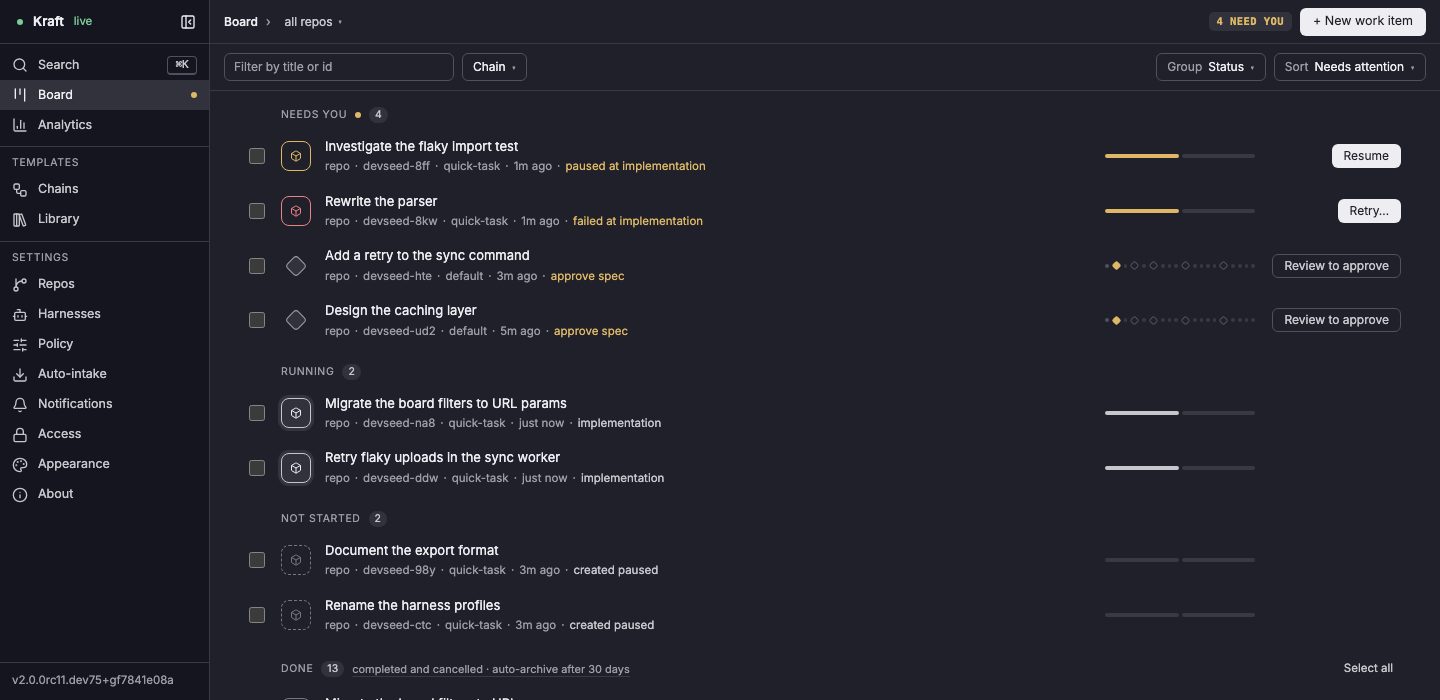
The Web UI reference describes each screen in the picture.
While it runs, kraft view list shows its status and node. To watch it work,
run kraft view watch in a third terminal: it takes no ID, redraws a live board
on every event, and holds its terminal until you press Ctrl-C.
You know it worked when the item leaves Not started. If a test fails in
verify, the item stops and waits for you: its stop reason names the failing
command and its scope, and kraft view logs ID shows that command's output.
5. Approve at the gate
After implementation and verify, the chain reaches approve_change and
stops. The item moves under Needs you, and kraft view list shows it:
ID        STATUS     GATE            NODE            TITLE
vtdrwv5p  needs you  approve_change  approve_change  add a unit test for parse_duration
The change is already committed on the item's own branch. Read it, then approve:
kraft view diff ID
kraft item approve ID
approve names the gate it approved and says where the item is now:
approved approve_change on vtdrwv5p; the item is now running
To send the change back instead, run kraft item reject ID --note "...": the
node before the gate runs again with your note. Nothing comes after this gate,
so approving finishes the item:
ID        STATUS  GATE  NODE            TITLE
vtdrwv5p  done    -     approve_change  add a unit test for parse_duration
You know it worked when the board shows the item under Done, and
kraft view list shows its status as done. A failure shows as failed or
needs you: see Troubleshooting below.
6. Where is my change?
This chain opens no merge request: the change stays on the item's own branch, in its worktree. Run one of these with the item's ID:
| Command | What it does |
|---|---|
kraft view diff ID | Prints the change, against the base branch. |
kraft repo path ID | Prints the worktree's path. cd "$(kraft repo path ID)" goes there. |
kraft repo open ID | Opens the worktree in your editor: the one set in Settings, else $KRAFT_EDITOR, else the OS default app. --editor code, cursor, zed, obsidian or system picks one. |
Merge the branch yourself, or run the next piece of work on default, which
opens and merges a merge request for you.
Troubleshooting
An item that stops shows under Needs you with a reason. Read it with
kraft view show ID, then the log of the session that stopped it with
kraft view logs ID, then check the install with kraft admin doctor. In
Claude Code, /kraft:triage does this for you, and offers to retry, raise a cap,
or hand the item back to you.
Troubleshooting maps every stop reason to its fix. These four are the ones a first run most often hits:
| It stops with | The fix is in |
|---|---|
... nothing registers it for Claude Code ..., at its first agent step with 0 tokens spent. | A task Kraft wouldn't launch |
no setup_command declared for <repo> in repos.yaml ..., before its first node runs. | no setup_command declared |
A config error at its test node: the repo declares neither test_scopes nor test_command. | declares neither test_scopes nor test_command |
kraft admin doctor fails its agent: claude row. | The agent row and the service PATH |
Next: the real chain
You have run a work item end to end: filed, reviewed its chain, started it,
read the diff and approved it at a gate. Part 2 runs the default chain, which
stops at more gates and ends in a merged merge request:
The real chain.
If an item stopped on the way, the table above sends you to the fix.