The real chain
Part 2 of 2. Part 1 ran a work item on
quick-task, which has no gates. This page runs the default chain to a merged
pull request. It takes longer, because it waits for your approvals, CI, and the
forge. A gate is a
node where you decide.
This part has its own two steps. Start the server and connect the repo in Part 1 first (its steps 1 and 2).
The chain you are about to run
Each line is a node of config/chains/default.yaml, in order. The three
approval gates before the code is written, and the two reviews after, are where
the chain stops for you.
- spec
- spec_approval[you approve]reject re-runs spec
- plan
- plan_approval[you approve]reject re-runs plan
- chain_revisionproposes changes to the nodes still to run, usually none
- chain_revision_approval[only if it proposed changes]reject re-runs chain_revision
- implementation
- verification[↻ fix loop]your tests, then a code review
- work_brief
- local_review[you approve]reject re-runs implementation
- describe_merge_request
- draft_merge_requestrebase, then open a draft
- merge_request_feedback[↻ fix loop]CI and automated review
- work_item_summary
- final_review[you approve]reject re-runs implementation
- mark_ready
- external_approvalwaits for your forge's required approval, if any
- merge
- post_merge_ciwaits for the post-merge pipeline
/kraft:handoff to file work,
/kraft:board to see it, /kraft:gates to approve. See
Use Kraft from your agent.1. Try the real chain, and its gates
default opens and merges a pull request through your forge. Part 1 works
without any of this; before you start default, the repo needs:
- A GitHub or GitLab remote, with
ghorglablogged in. - CI that runs on pull requests. Kraft waits for the merge request's checks
to pass. On GitHub, a pull request with no checks at all reads as "no checks
yet" and stays pending, so
merge_request_feedbackwaits until its 90-minute cap and then stops and waits for you. A repo with no CI can setci_checks: falseon its entry inrepos.yamlto skip both CI waits, before and after the merge. - A review rule only if you can meet it.
external_approvalwaits while a branch rule requires an approving review. GitHub does not let you approve your own pull request, so on a solo repo with such a rule it waits until you remove the rule or someone else approves. With no such rule it passes straight away, so a solo developer needs nothing here.
Check the forge
Check the forge before you start:
kraft admin doctor
gh auth status
gh auth status (or glab auth status) reports you as logged in. In the
doctor output, the repo's forge row reads like this:
ok forge my-project github · gh
It fails if gh or glab is missing, or if the repo had no GitHub or GitLab
origin when you connected it. For the second, set forge: github or
forge: gitlab on the repo in Settings › Repos and Review & publish (or in
repos.yaml). For a waiting item, see
Waiting on CI or a review.
default is the chain most work runs on, and the default for --chain unless
the repo sets default_chain, so you can leave the flag off here. Give resume
the new item's ID, not the first one's:
kraft item create "add a --dry-run flag to the sync command"
kraft item resume ID
Before any code is written it stops at three gates, one after another:
spec_approval, then plan_approval, then chain_revision_approval. The last
is about the chain itself: an agent checks the approved spec and plan against
the nodes still to run and proposes changes to them, and when it proposes none,
which is usual, the gate passes without asking you. Each gate shows up under
Needs you on the board. Open one to read the document it is about:
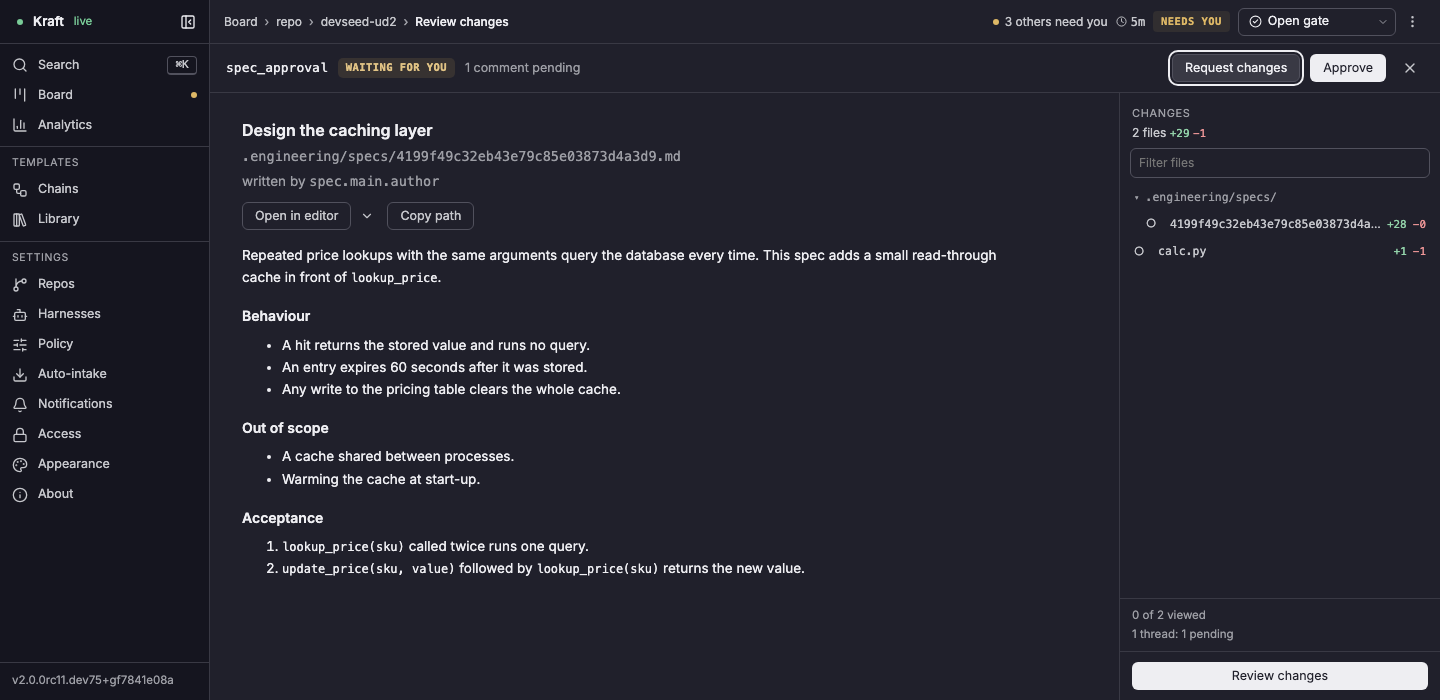
kraft view artifact ID reads the document the gate is about, and
kraft item approve ID approves it, as Approve does at the gate on the
item's page:
kraft view artifact ID
kraft item approve ID
approve names the gate it approved and says where the item is now:
approved spec_approval on 9d0ab38ff3c9439b90506df0f6966660; the item is now running
To send it back instead, run kraft item reject ID --note "...", or use
Request changes… at the gate on the item's page. The node that wrote the document
runs again with your note. Request changes on the review page, the button in
the picture, sends the gate back the same way, with your summary and review
threads as the note: it is kraft item review ID request-changes, and
Reviewing a change covers it.
You know it worked when, after your last approval, the item moves out of
Needs you and into Running, and the board shows implementation started.
Implementation and tests take a while: the item comes back under Needs you at
local_review, which is step 2.
No forge or CI
Added in 2.1
Without a GitHub or GitLab origin, default cannot open its merge request,
and kraft admin doctor fails the repo's forge row. Part 1 needs no forge, so
run quick-task on such a repo and merge its branch yourself. A repo with a
forge and no CI can set ci_checks: false in
repos.yaml, as the list above says.
2. Review before it merges
After implementation and verification, the item stops at local_review, and
later at final_review. Each comes with a diff to read first.
kraft view diff ID --stat shows how big it is, and kraft view diff ID shows
the full diff:
kraft view diff ID --stat
kraft view diff ID
Kraft commits after every task, so by a gate the change is already on the item's branch. The diff opens with the change under review: every commit since the base, the item's spec and plan documents among them. Below it, uncommitted lists whatever an agent left in the worktree without committing. "(nothing uncommitted)" there is normal, not an empty review.
Approve local_review and Kraft opens a draft merge request and runs CI and
automated review on it. Approve final_review and it marks the request ready,
waits for the merge request's external approval on your forge, then merges.
Run kraft item approve ID at each gate, once you have read the diff, and
kraft view list to see the item's status:
kraft item approve ID
kraft view list
Each approve prints a line like that, naming the gate it approved. You know it worked
when kraft view list shows the item's status as completed and the merge
request shows as merged on your forge. If it stays under Needs you at a gate
you approved, or at a later one, see If it stops.
What each gate does, and how caps and waits bound the chain, is in How a work item runs.
What to check at a gate
Added in 2.1
Each gate decides on one document. Reading it against the question below is enough for a first run:
| Gate | You read | Ask yourself | Reject sends it to |
|---|---|---|---|
spec_approval | the spec | Does it say what you asked for, with nothing added you did not want? | spec |
plan_approval | the plan | Are the tasks in a sensible order, and do they touch the files you expect? | plan |
chain_revision_approval | the proposed change to the rest of the chain | Do you want the nodes it adds, drops or changes? | chain_revision |
local_review | the work brief and the diff | Is the diff the change you wanted, with tests for it? | implementation |
final_review | the summary and the merge request | Did CI and the automated review settle everything they raised? | implementation |
A rejection needs a note: the node it sends back to runs again with it.
If it stops
Added in 2.1
An item that stops shows under Needs you with a reason. Read it with
kraft view show ID, then kraft view logs ID, then kraft admin doctor. These
are the ones this part most often hits:
| It stops or waits | The fix is in |
|---|---|
At merge_request_feedback, with the pull request open and no checks. | Waiting on CI or a review, or set ci_checks: false (see No forge or CI). |
At external_approval, on a branch rule that needs an approving review. | The same section: on a solo repo, remove the rule or have someone else approve. |
At draft merge request, with the doctor's forge row failing. | Doctor failures. |
| At a gate you approved, still under Needs you. | kraft view show ID names the gate it now waits at: it may be the next one. |
Troubleshooting maps every other stop reason to its fix, and a failure in Part 1's steps is covered under Part 1's troubleshooting.
Next steps
- Reviewing a change: comment on a work item and approve or send back a gate, from the web UI or the CLI.
- Run Kraft as a service: keep the server running in the background and start it at login, with
kraft admin install-service;kraftin a terminal stops when you close it. - Write your own chain: change what runs between filing and merge.
- Remote access: approve a gate from your phone.