Remote access
Reach the Kraft board from a phone or another machine by binding it off loopback and turning on password auth. You get the real board, with the same auth, at an address you choose.
Before you start
- A password. Kraft refuses any bind off loopback until one is set.
- The hostname or address you will type in the other device's browser. It goes
in
allowed_hosts. - The port. It is 8765 unless you set
portinaccess.yamlor pass--port. Use your port wherever this page says 8765. access.yaml, which lives in$KRAFT_CONFIG_DIRwhen you set it, else in$KRAFT_HOME/config/(by default~/.kraft/config/).
Which of these you need depends on the way in you pick. Choose a way comes next.
Choose a way
Kraft binds 127.0.0.1 by default and skips auth for local clients. Any other
bind makes Kraft require the password from every client, local ones included,
and check browser Host headers against allowed_hosts.
Pick the narrowest way that works, then follow only its section. The first four end at Restart Kraft and Check it worked. The last, the webhook proxy, needs no restart of Kraft.
| Way | Choose it when | It needs |
|---|---|---|
| Over Tailscale (recommended) | Your devices are on one tailnet. Only they can reach the board, and your LAN cannot. | Tailscale running before Kraft, a hand edit of access.yaml, and a restart. |
| On your local network | The phone and this machine share a network you trust. | A 0.0.0.0 bind, which listens on every network this machine is on, and a restart. |
| Over a Cloudflare Quick Tunnel | You cannot use Tailscale, and accept the board on the public internet. | cloudflared, a 0.0.0.0 bind, a long random password, and a restart. |
| Behind a reverse proxy you run | You run Caddy, nginx or another proxy, and want the board at a name of your own. | A 0.0.0.0 bind, a password, the name in allowed_hosts, a proxy that passes Host, Origin and the WebSocket on, and a restart. |
| Put a proxy in front of Kraft | A tunnel or reverse proxy on this machine gets a 403 for every request, and what must pass through is webhooks or scripts, not the board. | The proxy's Host setting, a password, and an X-Forwarded-For the proxy sets itself. |
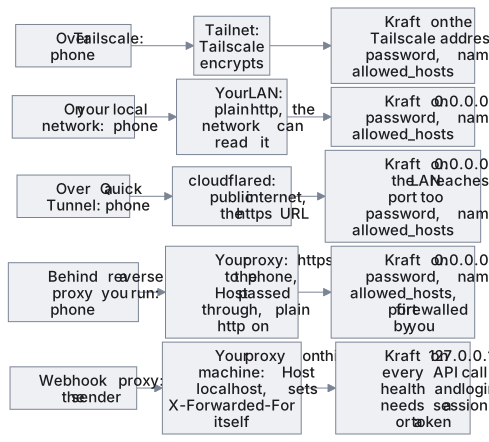
The path a request takes in each way:
Set a password
Kraft refuses any bind off loopback until a password is set, both at
kraft admin start and on the Settings › Access screen. On 127.0.0.1 the
screen lists the password under Not used on 127.0.0.1, and picking
Local network asks for one: Set and switch saves the password and the
0.0.0.0 bind in one step (on a phone, a Set a password sheet does the
same). The button reads Switch when a password is already set.
Once the bind is off loopback, every browser signs in, including one on the
machine itself. Kraft stores only the password's hash, in access.yaml. The
Access screen's Password card changes it once Kraft is off loopback.
To set a password and leave the bind alone, send it by itself while Kraft is
running on 127.0.0.1, which is the default. kraft admin health shows whether
a server answers; if none does, start one with kraft admin start --detach. This reads it without echo and passes it through pipes
between built-in and jq commands, so it stays out of your shell history and
the process list. It needs jq. Run read first, type the password, and press
Enter:
IFS= read -rs PW
Then send it and clear it:
printf '%s' "$PW" | jq -Rs '{password: .}' | curl -X PUT http://127.0.0.1:8765/api/access \
  -H 'Content-Type: application/json' --data @-
unset PW
You know it worked when the reply shows "password_set":true.
Over Tailscale
The Access screen offers only 127.0.0.1 and 0.0.0.0, so set a Tailscale
bind in access.yaml by hand. Start Tailscale before Kraft: the Tailscale
address does not exist until Tailscale is up, and the bind fails without it.
- Set a password with the commands in Set a password.
They leave the bind on
127.0.0.1. Picking Local network on the Access screen would also set one, but it writesbind: 0.0.0.0with it. - Find the machine's Tailscale address and name.
tailscale ip -4prints the address, such as100.101.102.103:tailscale ip -4
The first line oftailscale statusnames this machine:tailscale status - Pause any active item. Once you edit
bindin the next step, thekraftCLI dials the new address, where nothing listens yet, sokraft admin restartcannot list the agents it is about to end. - In
access.yaml, setbindto that address and add the machine's tailnet name toallowed_hosts:config/access.yamlbind: 100.101.102.103 allowed_hosts: - mybox.tailnet-name.ts.net
Settingbindin the file, rather than passing--host, keeps thekraftCLI in your other shells pointed at the same address, and keeps the bind across a restart. Runkraft admin doctorand read itsaccess.yamlrow to confirm the file parses. Itsserverrow fails until the restart.
From here until the restart, change nothing on the Access screen. Opening it, or using its Restart Kraft button, is safe. A change made there rewritesaccess.yamlfrom what the running server holds, which reverts your hand-editedbindandallowed_hosts. - Restart Kraft so it reads the new bind.
- From a device on your tailnet, open
http://mybox.tailnet-name.ts.net:8765/. Tailscale encrypts the traffic between your devices.
After the restart the Access screen shows Local network as chosen, since the
bind is off loopback. Do not click it: that writes 0.0.0.0 over your Tailscale
address.
On your local network
- Open Settings › Access and choose Local network (
0.0.0.0). The screen asks for what is missing: a password if none is set yet, and the name or address your phone will type, filled in with this machine's LAN address (192.168.1.20). - Click Set and switch, which reads Switch when a password is already set. The bind, the password and the host are saved at once, and the bind waits for a restart. The Allowed hosts, Password and Sessions cards appear.
- Under Allowed hosts, add any other name or address you will type in the
phone's browser. The list is for the names other devices use: on the machine
itself the board keeps working at
http://127.0.0.1:8765, behind the same sign-in. An empty list refuses every other device's browser, and the card then offers this machine's address. - Restart Kraft so it binds the new address.
- From the phone, open
http://192.168.1.20:8765/and log in. The traffic is plain HTTP, so anyone on the network can read it.
Over a Cloudflare Quick Tunnel
*.trycloudflare.com URL reaches the login page, and the password is the
barrier.Kraft locks an address out for 15 minutes after 5 failed logins, but
if the tunnel does not pass on the visitor's address, every visitor counts as
one address and a stranger's guesses can lock you out too. See
Login.Open only the tunnel's https:// URL, so the
session cookie is marked Secure. The tunnel also needs a 0.0.0.0 bind,
which listens on every interface, your LAN included. If your LAN is
untrusted, block the port at your firewall for other interfaces.- Run
cloudflared tunnel --url http://localhost:8765. It prints a*.trycloudflare.comURL. The URL changes every timecloudflaredstarts: after the first time, add each new hostname under Allowed hosts, where it applies at once, with no restart. - On the Access screen, choose Local network, setting the password if it
asks. The phone's host field is pre-filled with the machine's LAN address:
replace it with the tunnel's hostname. Or, with a password already set, write
bind: 0.0.0.0and the hostname underallowed_hostsinaccess.yaml. - Restart Kraft so it binds the new address.
Keep the bind in access.yaml, not in kraft admin start --host 0.0.0.0.
kraft admin restart starts the server from access.yaml alone, so a bind you
passed with --host is gone after a restart. The tunnel then reaches a server
on 127.0.0.1, which skips auth for local clients. Only the hostname check
stands between it and the internet: Kraft refuses a request addressed to any name
but 127.0.0.1, localhost or [::1].
Behind a reverse proxy you run
Caddy, nginx or another proxy you run can serve the board at a name of your own
while Kraft listens on a network bind behind it. Kraft listens on plain http, so
the proxy serves https. Off loopback, Kraft asks every client for the password or
a token before any API call, a proxy on this machine included. /api/health, the
page and its assets are open. Kraft also checks the Host and Origin the proxy
passes on.
- Set a password with the commands in Set a password.
- In
access.yaml, setbindoff loopback and add the name your browser will type toallowed_hosts:config/access.yamlbind: 0.0.0.0 allowed_hosts: - kraft.example.com
Bind0.0.0.0, not127.0.0.1, even when the proxy runs on this machine. On a loopback bind Kraft ignoresallowed_hostsand answers only a loopbackHost. So every request is refused unless the proxy sendsHost: localhost, and then the board's sign-in and every change are refused as cross-site. That is why Put a proxy in front of Kraft serves webhooks and scripts only.
Until the restart, change nothing on the Access screen: a change there rewritesaccess.yamlfrom what the running server holds and undoes this edit. - Block port 8765 at your firewall for every address but the proxy's, before you restart. The wider bind listens on every network this machine is on, and a request that reaches the port directly meets only the password or a token, over plain http.
- Set the proxy to pass what the table lists, with the setting your proxy uses
for each. The first four rows are what the board needs. The last one keeps the
sign-in lockout per client.
The proxy must What Kraft does with it Without it Pass Hostas the browser sent it, port included. Do not set it tolocalhostor to Kraft's own address.Checks the name against allowed_hostsfor a browser request, and compares theHostwith theOriginof every write and of the live-update socket.An unlisted name gets a 403(the page names it). AHostrewritten tolocalhostor127.0.0.1(nginx's default) loads the page, but Kraft refuses the sign-in, every change and the socket ascross-site request refused.Pass Originthrough unchanged.Refuses a write (any request but GETorHEAD) or a socket whoseOriginnames another host and port thanHost, unless it names this machine.An Originthe proxy changes gets the403,cross-site request refused. One it drops turns the cross-site check off for writes.Pass the WebSocket upgrade for /api/ws/events.Applies the same checks and the sign-in to the socket, and closes it when one fails. No live updates: the sidebar shows reconnecting… instead of live. Send X-Forwarded-Proto: httpswhen it serves https.Marks the session cookie Securewhen the request is https or this header sayshttps.The cookie is not marked Secure.Append the client's address to X-Forwarded-For. Do not pass a caller's own header through as sent.Takes the client from the last address in the header that is not 127.0.0.1or::1, and counts failed logins per client.Every visitor counts as one address: 5 failed logins from anyone lock everyone out for 15 minutes. A header passed through as sent lets a caller pick its own address, so it is never locked out.
Kraft takes the client address fromX-Forwarded-Foronly when the peer is at127.0.0.1or::1, which is uvicorn's default list. A proxy on another machine connects from its own address, so Kraft takes every client for that proxy and the lockout is shared.FORWARDED_ALLOW_IPSin the server's environment replaces the list: set it to that proxy's address only, never*.
The hop from a proxy on another machine to Kraft is plain http, so the password crosses that network in the clear. - Restart Kraft so it binds the new address.
- Check it as Check it worked says, at the proxy's own name, including the two requests for this way.
Restart Kraft
The first four ways end here, and so does Rotate the token. Kraft binds a new address, and writes a new token, only when it starts. Pick the option that matches how Kraft runs:
- When Kraft runs as a service, the Access screen offers Restart Kraft.
- Otherwise run
kraft admin restart, which reads the new bind fromaccess.yaml. - A server running in a terminal only stops, so start it again there with
kraft.
A restart ends the agent of every active item, and each stops as failed until
you retry it. The dialog says how many are active. Pause them first to avoid
that: see A restart ends running agents.
When Kraft is back, resume what you paused with kraft item resume ID.
If Kraft does not come back
A restart stops the old server first, then starts one on the new bind. If
Tailscale is down or the address is mistyped, the start fails, and the kraft
CLI dials the new address, where nothing answers. For a server started with
--detach, kraft admin restart prints the error and where the whole log is:
kraft: detached start failed: <the last error line of the log>
<the end of the server's output>
kraft: the whole log is /home/you/.kraft/run/logs/server.log
The first line names the cause only when the log has a last line that looks
like SomeError: text, and then it is that line. Otherwise the cause is in the
end of the output. A server you ran in a terminal is only stopped: kraft admin restart
prints kraft: was running attached to a terminal - start it again there: kraft
and exits 1, and the error shows in that terminal when you run kraft.
If the server does not answer within 10 seconds, it prints
kraft: detached start did not come up within 10s - check <the log's path>.
A service is restarted through its manager instead: when the board stays
unreachable, read the end of run/logs/server.log.
- Fix the cause, or put the old bind back: set
bindinaccess.yamlto what it was before your edit (127.0.0.1if you never changed it). - Start Kraft again:
kraft admin start --detach, orkraft admin restartwhen it runs as a service, orkraftin the terminal where you ran it.
You know it worked when the status row of kraft admin health says ok.
Check it worked
For the first four ways:
- From the phone or other machine, request the health endpoint, which needs no
login:
curl -s http://mybox.tailnet-name.ts.net:8765/api/health
Replace the address with your way's:http://192.168.1.20:8765on a local network,https://<your-tunnel-hostname>through a Quick Tunnel,https://<your-proxy-name>behind a reverse proxy. A JSON status confirms the request reaches Kraft. - Open the same address without
/api/healthin a browser. You should see the login page. Log in with your password. - On a computer, the sidebar reads live next to Kraft once the board's
event connection is open, and the board updates without a reload. If it stays
on reconnecting…, check that anything between the browser and Kraft, such
as a reverse proxy, passes WebSocket connections through and keeps the
Hostheader the browser sent.
Behind a reverse proxy you run, also check that Kraft asks for credentials and that the port is closed:
- Request an API route with no credentials. Put your proxy's name in
name:name=kraft.example.com curl -s -o /dev/null -w '%{http_code}\n' "https://$name/api/work-items"
It must print401. A401alone is not proof of this setup: signing in at step 2 is. Any other answer means:403: Kraft still binds127.0.0.1, so restart it, or no password is set.200: Kraft took the request for a local one. It still binds127.0.0.1, behind a proxy that sendsHost: localhost. That is the webhook setup, not this one.- Anything else comes from the proxy itself, such as a
502when it cannot reach Kraft.
- From a machine other than the proxy's, request the health endpoint at Kraft's
own port. Set
machineto this machine's address before you run it:machine=192.168.1.20 curl -m 5 "http://$machine:8765/api/health"
With the port blocked, this must fail: it times out, or is refused. A JSON status means the port is still open to the sign-in over plain http: block it before you go on.
The webhook proxy way has its own check, at the end of its page.
The browser says Kraft does not answer to the name you opened
The hostname is missing from allowed_hosts. The page names it.
- The list is held to browsers only:
curl, thekraftCLI and MCP are not checked against it. - Add the name in
access.yamland restart, or on the Access screen from an address already on the list, where it applies at once. - Enter the name alone, as
mybox.tailnet-name.ts.net. Kraft drops a port or anhttp://you type with it, and refuses a wildcard.
Rotate the token
$KRAFT_HOME/run/mcp-token and $KRAFT_HOME/run/trigger-token stay the same
until you delete them. The commands below follow KRAFT_RUN_DIR when it is
set, and kraft admin doctor prints each token's path. Rotate one when a copy
has leaked, or when someone who held it should no longer have it. The bearer token
says what each one grants. A server accepts the old value until it restarts.
- Pause any active item. A restart ends their agents, and once the
mcp-tokenis gone a server bound off loopback refuses thekraftCLI, sokraft admin restartcannot list them. - Delete the file you are rotating, or both. Run only the lines you need:
rm "${KRAFT_RUN_DIR:-${KRAFT_HOME:-$HOME/.kraft}/run}/trigger-token" rm "${KRAFT_RUN_DIR:-${KRAFT_HOME:-$HOME/.kraft}/run}/mcp-token" - Restart Kraft. Kraft writes a new token on start, with mode
0600. - Resume the items you paused:
kraft item resume ID. - Put the new value wherever you keep a copy. A CI secret or a webhook sender
holds the
trigger-token. A script, or a client on another machine, holds themcp-token. ThekraftCLI and the MCP server on this machine read the file on every call, so they need no setup.
You know it worked when the file's modification time is the time of the restart:
ls -l "${KRAFT_RUN_DIR:-${KRAFT_HOME:-$HOME/.kraft}/run}/trigger-token"
ls -l "${KRAFT_RUN_DIR:-${KRAFT_HOME:-$HOME/.kraft}/run}/mcp-token"
A file you failed to delete keeps its old time. kraft admin doctor also shows
the mcp token and trigger token rows with the file's path and mode 0600.
Next steps
- Kraft on a phone: the phone layout you now reach
- Security: the threat model behind the password and the host check
- Inbound triggers: call the API from off-machine
- access.yaml: every field of
access.yaml
Give a worker its login
Give the agent CLI a worker runs on, whether Claude Code, Codex, Cursor, OpenCode, Amp, Antigravity or Gemini CLI, a login it can use headless, and check that the worker reaches it.
Put a proxy in front of Kraft
Let a tunnel or reverse proxy on this machine pass webhooks and scripts to a loopback-bound Kraft by sending Host localhost, and check that nobody gets in without signing in.