The review page
The review page shows an item's diff with a bar along the bottom that holds your review. This page covers comparing, marking files viewed, commenting on a line, finishing a review and the page at a gate. For what each outcome does, see Reviewing a change.
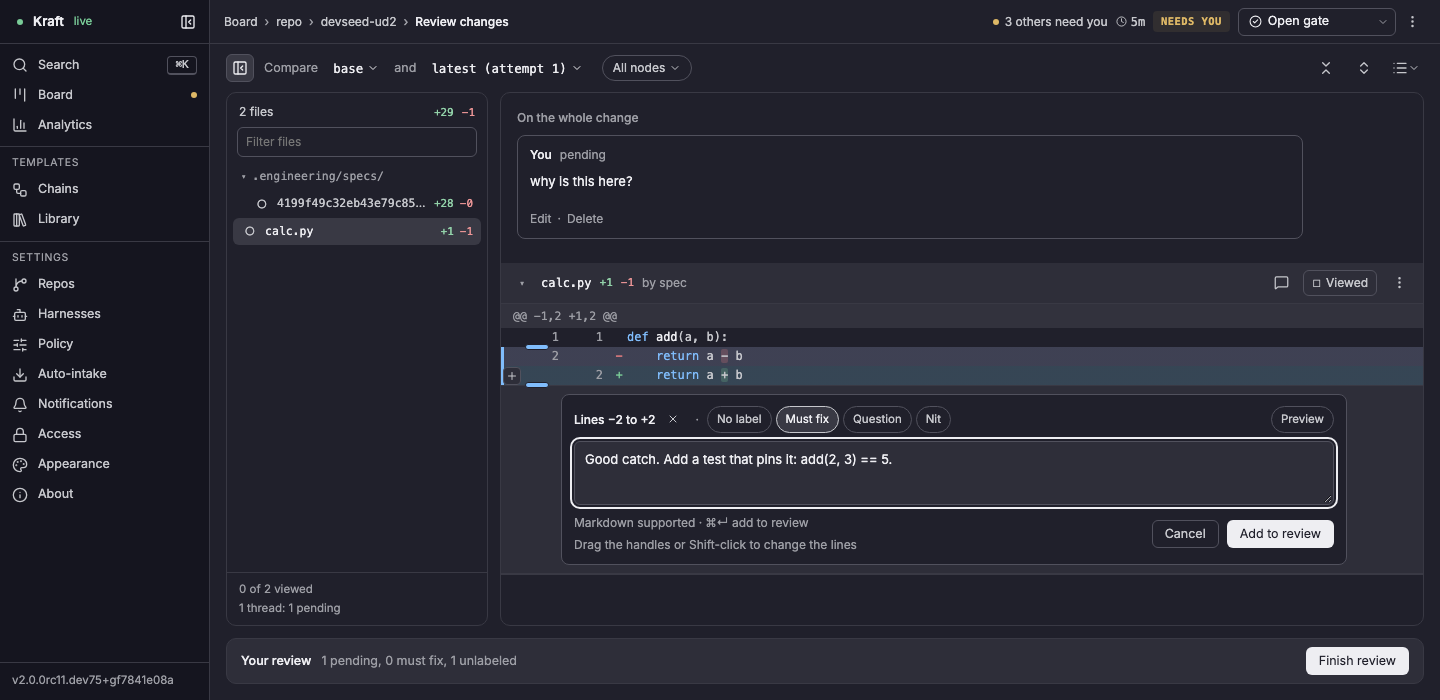
Review changes opens the review page at /work-items/<id>/review, at any point in the item's life and not only at a gate.
At a gate
Review from a waiting gate opens the page with the gate's document first, rendered and the gate along the top: what it decides, such as Approve spec, WAITING FOR YOU, the pending comment count, Request changes and Approve. Review changes, under Files on the branch, switches to the diff.
| You see | It means |
|---|---|
| Approving starts plan · 3 gates left · $0.040 of $10.00 spent | What Approve does next: the node it starts, the gates still to come and the spend against the cap |
| A reason beside Approve | Why it is unavailable: an open must-fix thread, or an item not waiting at this gate |
| Reviewer: Approve, Reject, Ready for you or Could not decide, with a note | The gate's agent reviewer's outcome for this round. The phone shows auto_review · and the word |
Compare
| Menu | Choices |
|---|---|
| Compare from | base, the item's starting point; an earlier attempt; or your last review, to see only what changed since you last submitted one |
| Compare to | latest (attempt N), the branch now, or an earlier attempt |
The page opens from base, or from your last review when you review the same gate again. All nodes ▾ limits the diff to the files chosen nodes touched. The list button holds the Display menu: Side-by-side or Inline, whitespace changes, changed words, line wrapping and one file at a time. A phone has no menus: it says when it shows only the change since your last review, and Show the whole change compares from base.
Viewed
Viewed on a file's header folds the file, dims it in the tree and counts it at the foot of the tree. Clear it and the file opens again. Each header also has a button to comment on the whole file and a ⋮ menu with Copy diff and Copy path.
Unchanged lines
Added in 2.1
A diff shows three unchanged lines around each change. The @@ row that heads a block has arrows for the lines left out above it: ↑ shows 20 more above the block, ↓ 20 more below the block before it and ↕ every line in between. A row at the foot of the file does the same after the last change. A new or deleted file has no arrows.
Syntax highlighting
Added in 2.1
Diffs and fenced code in comments and gate documents are coloured in 60 languages, following the scheme under Settings → Board & code. It runs in your browser from grammars that ship with Kraft, so it works offline. A file in any other language shows as plain text, as does a large change within a file. To ask for another language, open an issue on Kraft's GitHub repository.
Commenting on a line
Hover a line and select the + left of its number. To comment on a range, drag the + down to the last line, or select the first line's + or number and Shift-select the last. A drag stays inside one hunk.
Each side has its own lines: in Inline, select the left number then + for the old file's line, the right number then + for the new file's. A range can cross sides, from a removed line to the line that replaced it.
A comment box opens under the last line. Its header names the lines, with "old" for removed ones:
Line 5, Lines 5–7, Old line 2, Old 2 – new 2. The thread it makes is headed the same way.
While the box is open, handles on the range's first and last rows move either end, even past the other. A suggested change you typed moves with the range, and on a range across sides it is set aside and not sent until the start is back on the new side.
After you add the comment
| Where a thread is listed | It is on |
|---|---|
| Under its last line | A line in the comparison |
| On the whole change, above the files | No file, such as kraft item comment --body alone |
| Threads on files not in this comparison, at the page's foot | A file the comparison leaves out. Show the whole change there compares from base to latest and opens that file |
A range's lines stay shaded and are quoted in the thread, and the agent that reads the thread gets the same quote.
In the comment box
| Control | What it does |
|---|---|
| Label: No label, Must fix, Question, Nit | Must fix blocks approval: see Must-fix |
| Preview | Shows the Markdown rendered |
| ± Suggest change | Adds the lines you picked, for you to edit into the code you want. Left as it was, it isn't sent. Off for a range across sides or across lines the diff doesn't show |
| Add to review, or ⌘↵ | Keeps it as a draft. Drafts reach no agent until you finish the review |
| Cancel, or Esc | Discards it, after asking if you wrote something |
The keys that pick lines, comment and move between files are in Keyboard shortcuts.
Unresolved threads
Added in 2.6
The toolbar counts the threads not yet resolved: your drafts, open threads and claimed ones. Its arrows, or ] and [, go to the next or previous one (3 of 15 unresolved), in the order the page draws them: On the whole change, then file by file, then threads on files not in the comparison. After the last, the arrows go back to the first and say so. With none left, the toolbar says No unresolved threads.
Finish review
The bottom bar reads Your review with your drafts counted: N pending, N must fix, N unlabelled or No comments yet. At a gate it always offers Request changes and Approve, and Finish review joins them once drafts are pending. Away from a gate it offers only Finish review.
Finish review opens Finish your review, which lists the drafts, takes an optional overall note and offers three outcomes. Reviewing a change lists the CLI verb behind each.
| Outcome | Offered when | What it does |
|---|---|---|
| Request changes | Fix rounds are left, the item isn't done, cancelled or archived, and the dialog has found the node it would send the threads to | Shows where the work restarts, the nodes after it and which fix round this would be (Fix round N of M). With none left, it says No fix rounds left and is disabled |
| Comment only | Always. Outside a gate, the server refuses it with a 409 when nothing ahead in the chain reads the comments | Sends the threads without stopping anything |
| Approve | Only at a gate | The same as Approve on the gate. Greyed out while a must-fix thread is open |
Request changes in the bottom bar opens the dialog on that one action. With no threads the note is what the agent reads, so an empty note asks for text instead of sending. Submit review sends a review opened from Finish review.
Once a review has gone out, the bar reads N of M resolved. A comment added after that shows as pending, Finish review returns, and Approve opens Finish your review first, so a new comment is never sent with an approval unseen.
Related
- Reviewing a change: what comment, approve and request changes do, and the CLI verb for each.
- An item's page: the page Review changes is opened from, and the gate card with Approve and Request changes….
Config before an item starts
What the Config tabs show before Start, where each value comes from, and how a draft of overrides is reviewed and applied.
Templates
The Chains and Library screens that edit the files an item is copied from, and the marks on content that extends, comes from an add-on or is read-only.