Free disk space
Each work item gets a git worktree in run/worktrees/<item id>/, a full checkout of its repo, plus any dependencies its setup command installed. That adds up.
Before you start
$KRAFT_HOMEis~/.kraftunless you set it; see Environment variables. The commands findrun/as Kraft does:$KRAFT_RUN_DIRwhen you set it, elserun/under$KRAFT_HOME.- Deleting old session logs needs the server stopped. If Kraft runs as a service, stop it as Stop a service says.
Reclaim disk space
- See what uses space:
run="${KRAFT_RUN_DIR:-${KRAFT_HOME:-$HOME/.kraft}/run}"
du -sh "$run"/*
Withstorage.worktrees.limitset,kraft view storagelists the worktrees item by item instead.kraft item archive --reclaimablearchives every finished one, after showing what each loses. - Remove the worktrees you no longer need. A worktree is removed when its item
is abandoned or archived:
- Abandon a work item you no longer want:
kraft item abandon ID --reason "..." --yes. It removes the worktree, deletes the item's local branch, and removes its folder inrun/items/(and an older item's attachment copies inrun/attachments/). Uncommitted work is lost, and so are commits you never pushed. - Archive a completed or abandoned item from the board's Done group,
with
kraft item archive ID(it previews first and needs--yes), or withPOST /api/work-items/ID/archive. It removes the worktree, the sandbox home and the step outputs, and keeps the item's record, documents, session logs and attachment copies, so you can still read and duplicate it. Commit uncommitted changes in the worktree first, or copy them out fromkraft repo open ID: archiving loses them. - Auto-archive.
archive.after_daysinpolicy.yamlarchives completed and abandoned items that old. The shipped file sets30. Lower it to reclaim space sooner. See policy.yaml.
- Abandon a work item you no longer want:
- Delete an archived item's folder,
run/items/<item id>/, by hand, with the server stopped, to drop its documents and session files. Sessions from before one folder per item left their logs inrun/logs/and result files inrun/results/; delete those the same way. All of them stay after archiving.
You know it worked when du -sh "$run"/* shows worktrees smaller, and
ls "$run/worktrees" no longer lists the item.
What archive does to the branch
- It deletes the local branch only when every commit on it is somewhere else too: another branch such as the base, a remote-tracking branch, a tag or what Kraft pushed. Otherwise the branch stays, and the archive event says how many commits it kept.
- Commits on a detached HEAD in the worktree are kept on a new branch,
kraft/rescued/<item id>. If Kraft can't make that branch, it archives the item but leaves the worktree, and the archive event'sworktree_keptsays why.
An in-place item's archive deletes no folder, and keeps its branch when it holds commits nowhere else or when the checkout is on it: see Abandon or archive an in-place item.
kraft item complete and kraft item cancel keep the worktree until the
item is archived. A cancelled item that never pushed keeps its branch after
that too. Delete it by hand once you are done with it:
git branch -D <branch>.
Clean up from the Storage page
Added in 2.1
Use Settings › Storage when worktrees are over the limit, or when you want the space back.
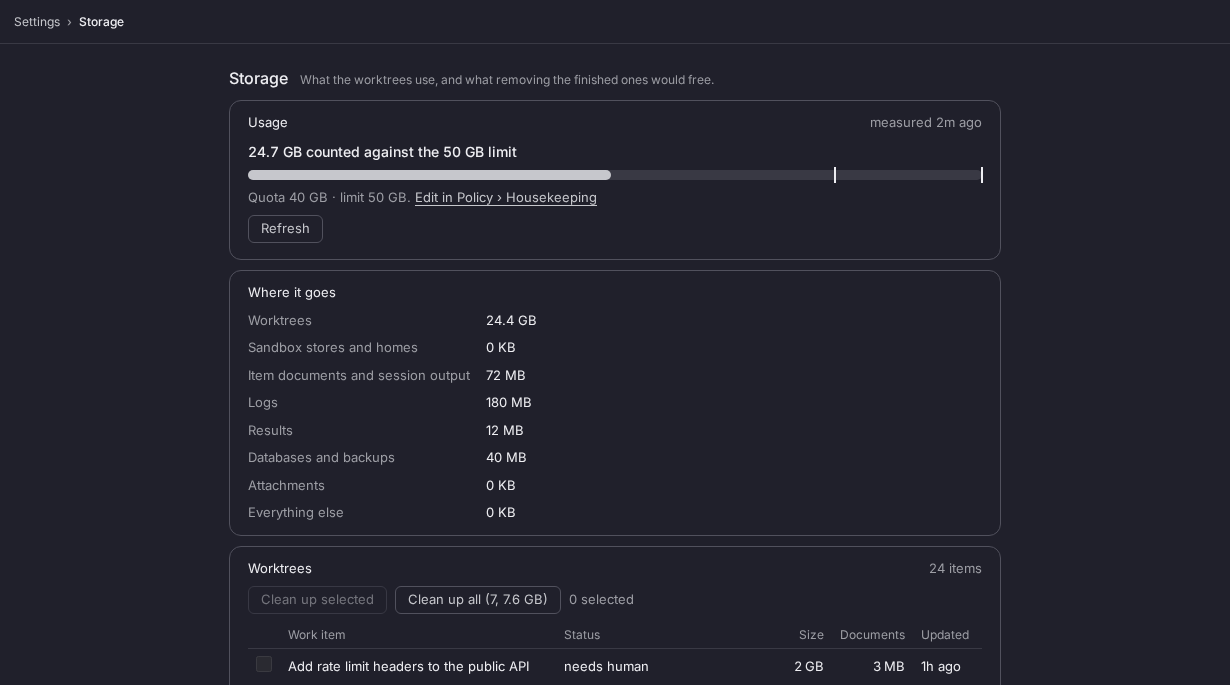
- Open Settings › Storage and tick the finished items you want to free, or take them all with Clean up all.
- Press Clean up selected or Clean up all, read the confirmation, then press Clean up N items and free X. The confirmation lists the uncommitted files each item loses.
Each item moves to Archived, and what archiving removes and keeps is as Reclaim disk space says. Held starts go within seconds. Storage describes the bar, the rows and the other controls. From a shell, kraft view storage prints the same breakdown and kraft item archive --reclaimable archives after showing the same confirmation.
You know it worked when the bar drops below the limit and the archived rows leave the list.
Saved copies of a repo's carry files sit in run/carried/, outside the quota.
Limit the disk worktrees use
Added in 2.1
Without a limit, worktrees use disk until you notice. Set one in policy.yaml
and Kraft tells you before the disk is full, and holds new starts at the limit:
storage:
  worktrees:
    limit: 10G
    quota: 8G   # optional; defaults to 80% of limit
Run kraft admin reload to apply it, or edit Settings › Policy ›
Housekeeping › Storage. A size is a whole number and a unit, such as 10G.
Over quota Kraft warns. Over limit it holds starts that need a new worktree,
and the instance reads degraded. Storage keys
has the size format, what counts toward each and the rest.
See where you stand:
kraft admin doctor
kraft admin health
Over the limit, make room in any of these ways, then wait about 10 seconds for the queue to start what is held:
- Archive finished items, from Settings › Storage or the board's Done group, as Reclaim disk space describes. Archiving removes the worktree and any uncommitted changes in it, keeps a branch with unpushed commits, and leaves the item restorable under Archived.
- Finish or abandon live work.
- Raise
limit.
A start that is held shows as queued with work_item_storage_held on its
timeline. An item that already has its worktree is never held, so finishing it
is always possible.
You know it worked when kraft admin doctor reports the storage line as ok,
and a held item leaves queued.
An item that runs in place has no worktree, so the limit never measures, holds or archives it.
Let Kraft make room
An instance left running unattended can sit held with nobody to clean up. Add
auto_cleanup and Kraft archives finished items itself when worktrees pass
the limit:
storage:
  worktrees:
    limit: 10G
    auto_cleanup:
      min_age: 24h   # the default; the block being there is what turns it on
Over limit, Kraft archives completed and abandoned items that ended at least min_age ago, oldest first, until usage is at or under quota. It needs a limit, and Storage keys has the rules.
If every finished item is newer than min_age, nothing is archived and starts
stay held. kraft admin doctor then says how many were too recent, and you make
room as above. If an item's documents keep usage over the limit, the server log
names it and the Storage page shows them under Documents; abandoning that
item removes them.
You know it ran when an item's timeline has work_item_archived with
reason: storage, and the Archived view shows it as archived by auto.
Next steps
- Settings: the Storage screen in full
- Back up and restore the database: copy the database before you delete anything by hand
- policy.yaml: set
storage.worktrees,archive.after_daysand the rest ofpolicy.yaml - Find the logs: where Kraft writes its logs and an item's files
Coming from 1.4
Update a 1.4 install to the current release without losing the database, act on the changes that need it, and go back to 1.4 if the update goes wrong.
Rotate the token
Replace the MCP token or the trigger token after a leak or when someone who held it should lose it, restart Kraft and check the new files.