Write your own chain
The new chain's file holds only what it changes: one node added after
verification. Every other node is read from default, so the chain keeps up
with it. The node itself goes in the library, where any chain can use it.
A chain that only one item needs is a one-off chain instead, and stays out of the library.
test_scopes in repos.yaml. The shipped
verification node runs every scope whose paths the change touches, and its
fix loop repairs the failures:test_scopes:
- paths: ["src/**"]
command: npm test
- paths: ["src/**/*.ts"]
command: sh -c 'npm run lint && npx tsc --noEmit'
command runs with no shell too. See
test_scopes.Before you start
- A running Kraft server and a connected repo.
- A lint command that exits 0 when the code is clean. This guide uses
npm run lint && npx tsc --noEmit. Use your own. - Your config directory:
~/.kraft/config/, or$KRAFT_HOME/config/if you setKRAFT_HOME. You editlibrary.yamlin it and add a file underchains/.
1. Add the tasks to the library
Add two tasks to library.yaml, under tasks:. One runs the linter. The other
is the agent that repairs what the linter reports.
tasks:
  lint:
    kind: subprocess
    command: sh -c 'npm run lint && npx tsc --noEmit'

  repair_lint:
    kind: agent
    harness: claude
    profile: strong
    prompt: Fix the lint and type errors the lint step reported. Change no behavior.
Kraft doesn't run command through a shell, so && and pipes need the
sh -c '...' wrapper. A failing lint becomes a critical finding that holds the
end of the command's output, and the repair agent reads it.
Inside a fix loop, Kraft replaces the repair task's prompt with its own
instruction. See Subprocess tasks for
how the command runs and how its exit code becomes a status, and
Fix loop and judge
for what the repair agent is told.
2. Add the node to the library
Add a lint node to library.yaml, under nodes::
nodes:
  lint:
    kind: exec
    skippable: false
    policy:
      time_cap_minutes: 30
    tasks:
      - id: lint
        extends: lint
    fix_loop:
      tasks:
        - id: repair
          extends: repair_lint
      judge:
        id: judge
        extends: kraft-default:strict_judge
      max_attempts: 3
What each key does:
skippable: false: refuseskraft item skipon this node, a chain revision that proposes skipping it, andkraft item create --skip-nodes lint.policy.time_cap_minutes: 30: caps the node's running time, fix loop included. Hitting it stops the item and waits for you. Kraft doesn't count it as a lint failure, so no repair attempt is spent. See Time caps.fix_loop.tasks: runs after a failing lint, then the lint runs again. The loop repeats until lint passes ormax_attemptsruns out. Then the node is stuck: an escalation turn tries first, then the item stops and waits for you. The loop's wall clock comes frompolicy.yaml(default, orloops.lint.fix_loop). See Fix loop and judge and policy.yaml.judge: optional.kraft-default:strict_judgeis the judge task the shipped library provides, the oneverificationuses. See The judge.
3. Make the chain
Write a chain that extends default and adds the lint node right after
verification. This is the whole file:
id: with-lint
extends: default
description: The default chain, with lint after verification.

add:
  - after: verification
    node:
      id: lint
      extends: lint
Every other node is read from chains/default.yaml each time Kraft loads the
chains. When default changes, whether you merge a release's changes into your
copy or your default extends the built-in
(Move onto kraft-default),
with-lint picks them up with no change to its own file. Besides add, a chain
can remove its parent's nodes and override their settings; see
Extending a chain.
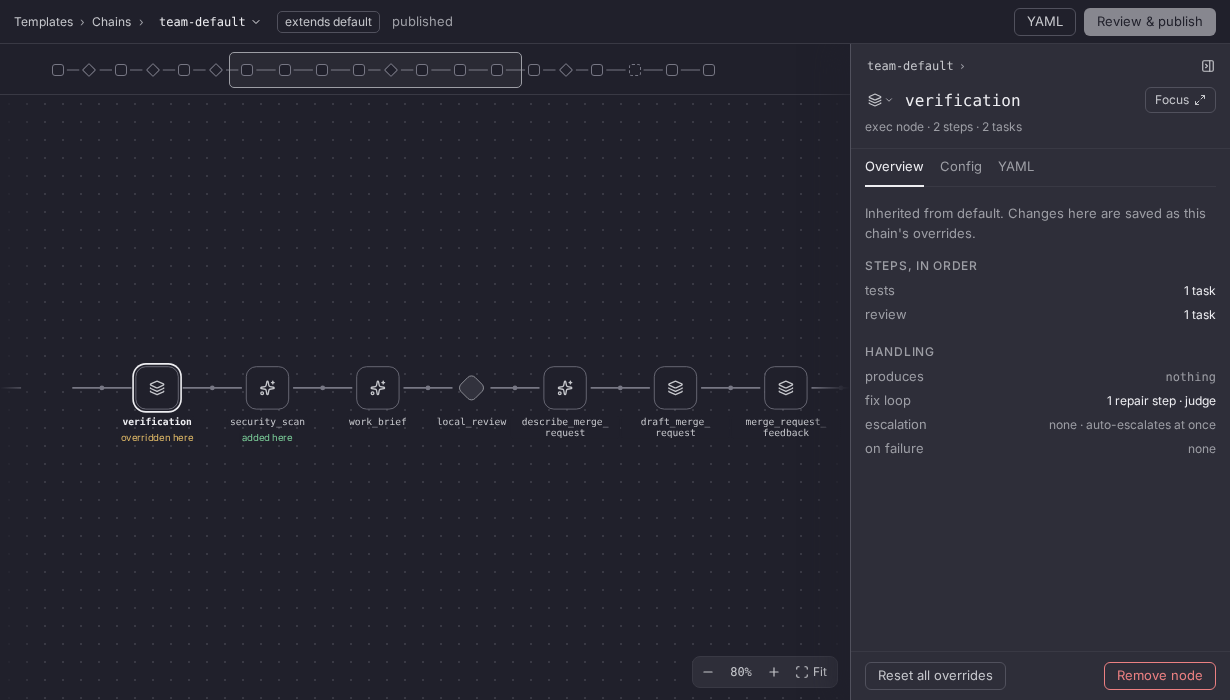
On Templates › Chains, a chain that extends another shows extends <parent>
in its header, and marks each node it adds added here and each it overrides
overridden here:
To own every node instead, copy the chain: cp -n chains/default.yaml chains/with-lint.yaml, change id: default to id: with-lint, and add the
lint node after verification yourself. A copy doesn't follow default, so
you merge each release's changes into it too.
4. Check it and load it
kraft admin templates lint
kraft admin reload
kraft admin templates show with-lint --resolved
A pass prints these two lines (the counts are your own):
$ kraft admin templates lint
3 chain(s), no errors
$ kraft admin reload
reloaded 3 template(s) and policy.yaml and intake.yaml
lintreads the files from disk. It printsN chain(s), no errorsbefore you reload. On an error it prints onefile:line:column: messageline for each issue and exits 1.reloadmakes the running server read the files again, with no restart. It printsinvalid:lines and exits 1 for a file that doesn't load.show --resolvedprints the chain with every library component expanded. Look for yourlintnode with itsfix_loop, itspolicyandskippable: false.showasks the running server, so before the reload it answersunknown chain.
5. Use it
Name the chain when you file work:
kraft item create "Add the export button" --chain with-lint
kraft item set-chain ID --chain with-lint switches an item that hasn't
started yet. Nodes the item was filed without (skip_nodes) stay out when the
new chain has them; a skipped node the new chain doesn't allow skipping is
refused with a 422.
To make it the repo's default instead, set default_chain: with-lint on the
repo's entry in repos.yaml. Every item filed on that repo without a chain then
gets with-lint, however it is filed: kraft item create, the MCP tool, the
board's New work item composer, POST /api/work-items, POST /api/triggers, and
auto-intake. Naming a chain still wins.
Check it worked
Steps 3 and 4 already show the chain loads. These checks prove it on a real item and cost a full run, so they are optional:
kraft item skip IDon the lint node answerspath: 'lint' does not allow skipping.- File a small item on the new chain. Once it passes
verification, list the lint node's findings:kraft view events ID --type findings_measured
The output is a table with the columnsSEQ,WHEN,TYPEandDETAIL. A failing lint shows afindings_measuredrow for nodelintwith onecriticalfinding. A clean lint shows afindings_measuredrow with no findings. Without--type,kraft view events IDalso shows what followed: afix_cycle_startedrow after a failing lint, ornode_completedforlintafter a clean one.
Run the full suite as its own node
Added in 2.4
A repo with a targeted_command verifies with it, in every round. If the merge request runs no CI, nothing runs the full suite. Add a second node after verification that does. Repairs inside verification stay fast, and the full suite runs once at the end, with its own fix loop.
id: full-suite
extends: default
add:
  - after: verification
    node:
      id: full_suite
      kind: exec
      tasks:
        - id: tests
          extends: kraft-default:verify_changed_scopes
          suite: full
      fix_loop:
        tasks:
          - id: repair
            extends: kraft-default:repair_verification
        judge:
          id: judge
          extends: kraft-default:strict_judge
        max_attempts: 2
Check it with kraft admin templates lint, then load it with kraft admin reload.
Known limits
Added in 2.5
A chain written for one item only, a one-off chain, is reviewed before its custom content runs. A change to a one-off item's chain before it starts brings the review back.
A command run from a local shell that kraft doesn't detect as a coding agent's
(see calls from a coding agent's shell)
reads as a person.
That holds both for this review and for the other doors that are a person's to use: a node's extra_prompt, a retry
that changes anything of a task but its model and effort, and an item's chain
draft. From a worker session, an escalation turn or the MCP server, each of those gets 403.
Next steps
- Chain file keys: every key a node, step and task takes.
- Library and chains: the library sections and how a chain extends them.
- Add a security review or a gate reviewer: put the shipped security review in a chain of your own, and change the default chain's gate reviewer.
- Share chains with add-ons: publish chains of your own as a Kraft add-on that other instances install. An add-on can't carry this guide's
subprocesslint task or extend your local library. - Move onto kraft-default: take what a new release ships without losing this chain.