The setup wizard on first start
Connect your first repo and file your first work item from the setup wizard that takes the board's place when you open Kraft's web UI with no repo connected. The wizard comes back whenever no repo is connected, and when you left it part-way. If you already followed Your first work item, you did the same job from a terminal and can skip this.
Before you start
- The server running (
kraft) and its web UI open athttp://127.0.0.1:8765. See Install. - A local git checkout with at least one commit.
With no repo connected, the board shows Nothing on the board yet and three setup steps. The header's + New work item is there too, so you can file work without finishing them. Filing one ends the setup.
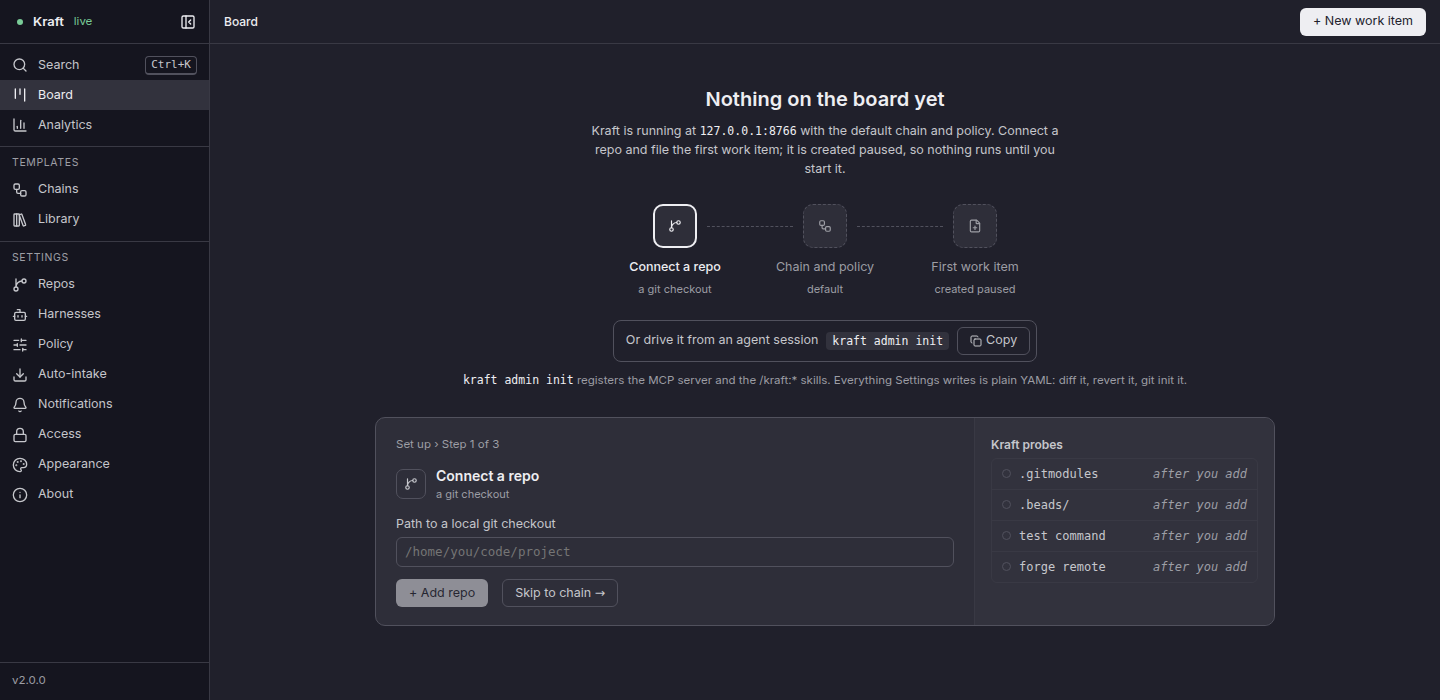
1. Connect a repo
- Type the path to a local git checkout. When the server was started inside a checkout that is not connected yet, a Try line under the field offers its path: click it to fill the field.
- Click + Add repo, which probes the repo. Before you add anything, the
panel beside the step lists what Kraft will probe (
.gitmodules,.beads/, the test command and the forge remote), each marked after you add. - Kraft lists what it found: those, the setup command and more. Check them.
- Click Add repo, which replaces + Add repo once the probe is done. It
does what
kraft repo connectdoes.
A repo with no commit yet cannot be added: the wizard says so beside Add repo. Commit its files, then click Check again.
Skip to chain → moves on to step 2 without a repo. The step is not marked done until one is added.
2. Chain and policy
The step shows the chain every item uses unless it names another (default)
and the policy's fix attempts and dollar cap. Open Chains takes you to the
chain. Continue moves on.
3. First work item
+ New work item opens the composer described in File a work item.
This step also says what Claude workers need before you start an item: Kraft's
MCP server, from the Kraft plugin or from kraft admin init, not both. Copy
commands copies the plugin install commands. Go to the board leaves the
wizard without filing anything.
Check it worked
- The wizard marks step 1 done once a repo is added, and Settings › Repos lists the repo.
- Adding a repo does not end the wizard: it stays in place of the board until
either of these happens:
- You leave its last step, with + New work item or Go to the board.
- The first work item exists, wherever it was filed: an item filed from the CLI while the wizard is open ends it, and the board shows the item.
- If you reload the page, or follow a link to another page and come back, the wizard opens at the step you were on. This browser remembers it.
Warnings the wizard shows
The wizard names what is missing on a repo, and where to set it. Each fix is in Settings › Repos: select the repo, change the field, then click Review & publish.
| The wizard says | What it means | The fix |
|---|---|---|
| No test command: connected disabled. In Settings › Repos, set its test command and Enable it, then publish. | Kraft found no test command, so it connected the repo disabled. Step 3's New work item cannot file to it: the composer and the new-item page list only enabled repos. | Set its test command, click Enable, then Review & publish. |
| No setup command found: its first work item stops before it starts until you set one, or tick No setup needed, in Settings › Repos | The repo is connected without a setup command, enabled or not. An item on it stops at once, before its first node runs, and its stop names the missing setup_command. | Set its setup command (such as npm ci or uv sync), or tick No setup needed for a repo with nothing to install. |
| No setup command: web has tests and nothing found prepares it. | The tests are in subdirectories. The wizard lists each directory that has tests and nothing to prepare them. | Set a setup command that covers them. |
Why did my item stop? lists the stop a missing setup command causes.
Next steps
- File a work item: the composer's fields, and what Create paused does.
- Use Kraft from your agent: register Kraft with Claude Code, Codex or another agent, so workers can run.
- The board: the groups and the side panel the board shows after the wizard.