How a work item runs
A work item moves through eight stages, from the moment you file it to the moment it is archived. This page follows it through them, using the words defined in Vocabulary. The statuses it holds on the way are on Work item statuses.
From filing to archive
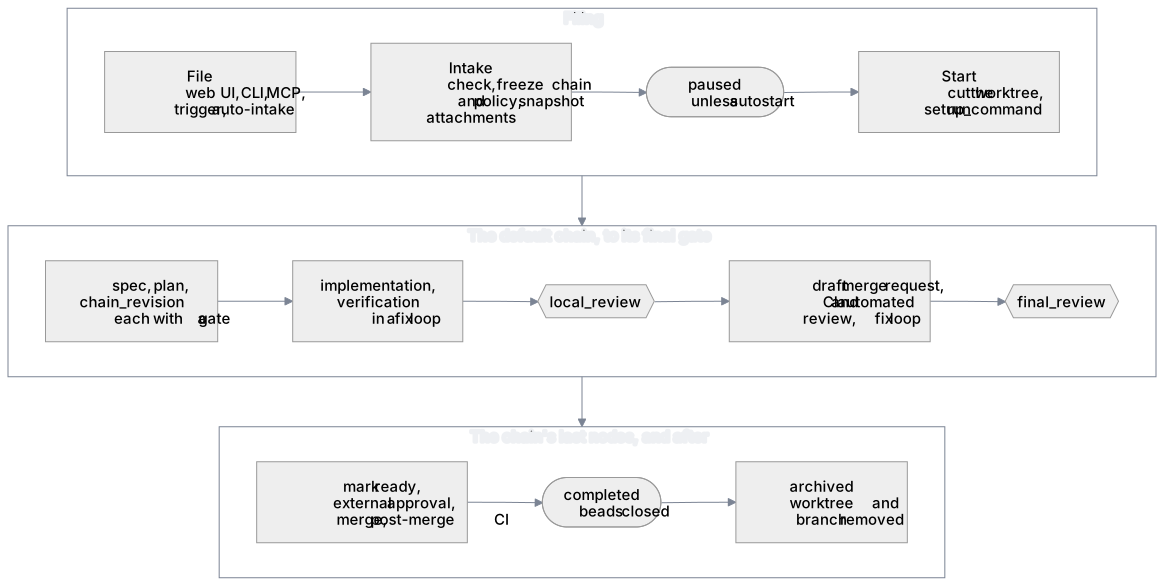
- Filing. You file an item from the web UI,
kraft item create, or an agent over MCP. A trigger files one too, and so does auto-intake, which picks up ready issues from beads when you turn it on. - Intake. Kraft checks the item, then freezes its chain and policy and copies any attached spec or plan. A later edit to a chain file changes nothing for this item. See Intake.
- Paused. A filed item waits, paused, until you start it. Nothing has run and nothing has been spent.
- Start.
kraft item resume(Start in the board's side panel) claims the item and cuts its worktree. See Starting an item, and Steering to give it a note on the way. - The chain. Kraft walks the nodes in order. An exec node runs its tasks.
A gate node stops the item until you decide. The shipped
defaultchain's nodes are listed under The default chain. See Inside a node for what a node does, Chain revision for how the chain changes after the plan is approved, and Steering for a note to the next agent. - Landing. The chain's last nodes mark the merge request ready, wait for an approving review if the forge requires one, merge it, and wait for the post-merge pipeline.
- Completed. When the last node finishes, the item is
completedand Kraft closes the issues it implements in beads. - Archived. Archiving removes the worktree and the branch and takes the item off the board. See Archiving.
Starting an item
A filed item is paused. --autostart starts it at once, with two exceptions: a
session Kraft started is refused it, and the MCP tools file only paused items.
A trigger that files an item is held to the same rule. See
Use Kraft from your agent. Auto-intake starts
what it files, but only on a chain with at least one gate.
Before the first node runs, Kraft:
- cuts a git worktree for the item from its base branch, on its own branch;
- copies the attached documents in; and
- runs the repo's
setup_command.
If a linked bead is still blocked by another bead, the item goes back to paused instead.
A workspace item's members are cut the same way, each as a worktree of its own connected repository, on a branch of the same name.
Inside a node
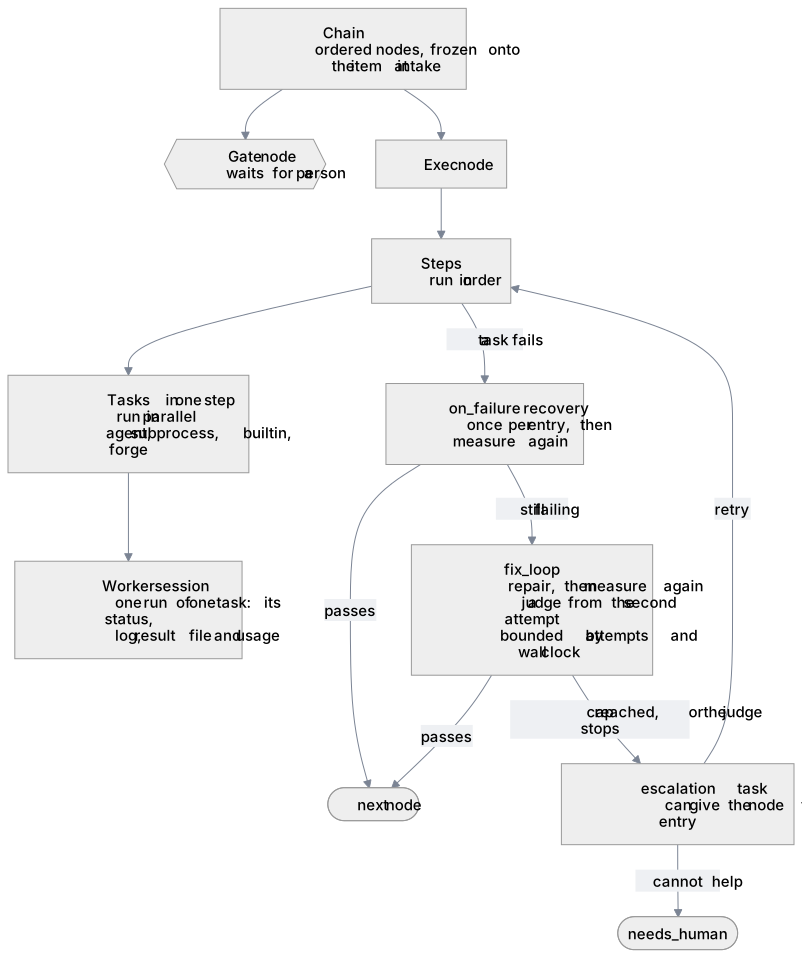
A chain is a list of nodes. A gate node waits for you. An exec node
runs steps in order, and the tasks in one step in parallel. Each run of
a task is a worker session: a row with its status, log, result file,
tokens, and cost. An agent or subprocess task launches a process for it. A
builtin or forge task runs inside Kraft. kraft view logs reads a session's
log.
When a task fails, a node can try three things, in this order. Each is optional, and each is declared on the node in its chain file (see Chain file keys).
| Stage | What it runs | It ends when |
|---|---|---|
Recovery (on_failure) | Repair steps, once per entry into the node, then the whole node again. It is for a problem outside the code, such as a label to fix on the merge request. | The repair steps finish and the node runs again. |
Fix loop (fix_loop) | A repair agent, then the whole node again from its first step. From the second attempt on, a judge agent decides whether the attempts are still converging. | The node passes, the loop reaches its attempt limit or its wall clock, or the judge stops it. |
Escalation (escalation) | A task that runs once the node is stuck. | If it succeeds, the node gets a fresh entry from its first step. If it does not, the item stops and waits for you. |
See Fix loop and judge for the loop's keys.
Some stops skip all three and go straight to you: a config error, a budget or
time cap, an infrastructure failure, a wait timeout, and an agent's question.
No repair task can fix those. A rate limit does not stop and wait for you at
all. It parks the item as rate_limited.
Escalation turns
A node with no escalation of its own gets a generic one instead. When it
stops stuck, and auto_escalate_stuck is on in policy.yaml (the default),
Kraft starts an escalation turn: an agent that reads the stopped item and
may retry it.
It answers only stuck stops, never the ones listed above, and at most
auto_escalate_stuck_cap times. You can also start or continue one yourself
with kraft item escalate. The
Security page lists what an escalation
turn is allowed to do.
The shipped chains
Kraft ships two chains: default, the full process, and quick-task, the
smallest.
The default chain
The default chain has these nodes, in order. A node marked gate waits for
you.
| Node | What it does |
|---|---|
spec | An agent writes the specification. |
spec_approval (gate) | You approve it. A reject sends the item back to spec. |
plan | An agent writes the implementation plan. |
plan_approval (gate) | You approve it. A reject goes back to plan. |
chain_revision | An agent reads the spec and plan against the nodes still to run and proposes changes. |
chain_revision_approval (gate) | You approve the proposal. It passes without asking you when nothing was proposed. A reject goes back to chain_revision. |
implementation | An agent implements the approved plan. |
verification | The changed test scopes run, then a code review, inside a fix loop. |
work_brief | An agent writes the brief you read before the merge request exists. |
local_review (gate) | You approve creating a draft merge request. A reject goes back to implementation. |
describe_merge_request | An agent writes the merge request's title, labels, reviewers, and description. |
draft_merge_request | Kraft rebases onto the base branch, then opens a draft merge request. |
merge_request_feedback | Kraft waits for CI and the automated review, inside a fix loop. If the base branch moves, the chain restarts from verification. |
work_item_summary | An agent writes the summary and review brief. |
final_review (gate) | You review the whole item and its summary. A reject goes back to implementation. |
mark_ready | Kraft marks the merge request ready. |
external_approval | Kraft waits for an approving review if the forge requires one. |
merge | Kraft merges the merge request. |
post_merge_ci | Kraft waits for the post-merge pipeline. |
How long each wait lasts and how many attempts each fix loop gets are in The default caps.
kraft admin templates show default --resolved prints the chain with every
library component expanded.
The quick-task chain
The quick-task chain is two nodes with no gates: implementation, then
verify. verify runs the repo's own test_scopes or test_command from
repos.yaml. On a repo that declares neither, the item stops and waits for you
with a config error, and Kraft guesses no command.
Chain revision
A chain is picked before its spec and plan exist. Once the plan is approved,
the chain_revision node has an agent read both against the nodes still to run
and propose changes. It may skip a node, add one built from library components,
or adjust a task's model or effort, or an operational limit, within the
maxima in policy.yaml.
Only nodes after its gate may change. A gate never does. Nodes that open, describe, sync, ready, or merge the merge request, or wait on its checks, cannot be skipped.
Usually it proposes nothing, and the chain_revision_approval gate passes
without asking anyone. When it does propose something, the gate shows the
rationale, each change with the line of the spec or plan behind it, and the
diff.
Approving replaces the item's chain with exactly the revision you were shown.
Kraft ties your approval to what you read: if the revision changed since, it
refuses the approval until you look again. A proposal that would not validate
cannot be approved. Reject it back to chain_revision instead.
The --digest flag of kraft item approve pins an
approval to the revision you read.
Steering
A steer is a note to the next agent Kraft launches for this item. The first agent task that runs uses it once, and then Kraft drops it. There is no channel into an agent that is already running, so a steer never reaches one. To redirect running work, pause it and resume it with a steer.
You give a steer in four ways:
kraft item resume ID --steer "..."reaches every paused agent task.--steer-task PATH=TEXTaddresses one task by its canonical path.kraft item retry ID --steer "..."goes into the prompt of the retried node.- Rejecting a gate with
--notesends the note, as a steer, to the node the gate sends the item back to. - Answering an agent's question:
kraft item resume ID --steer "..."on an item that stopped with one.
Kraft refuses a steer that no agent task would read, for example on a node that only runs a subprocess or waits on CI. It tells you so rather than dropping the text.
Review threads are the other way to give feedback. They carry line-level comments and stay until resolved. See Reviewing a change.
Archiving
Archiving removes the item's worktree and branch and takes it off the board. The record of what happened stays.
- You archive by hand, or set
archive.after_daysinpolicy.yamlto archive ended items automatically. The shipped file sets 30, and deleting the key turns it off. - A branch with commits that are nowhere else, such as a cancelled item's unpushed work, is kept.
- For a workspace item, archiving removes each member's worktree and branch from its connected repository too, with the same rule for each branch.
Related
- Work item statuses: the eight statuses, the moves between them, and what the board shows.
- Caps and budgets: the limits behind the stops that wait for you.
- Chain file keys: the keys that declare steps, recovery, fix loops, and escalation.
- Architecture: the process and modules that do all of this.